
A reviewer opens a financial model late in the process. The workbook has multiple tabs, a forecast stretching across years, and formulas that appear to work. Yet the first question is not whether the model looks polished. It is whether anyone can tell what is safe to rely on.
In practice, many review delays come from avoidable uncertainty: a blue number that might be a formula, an assumption buried inside a calculation, a total that does not visibly reconcile, or a scenario change that quietly breaks a downstream schedule.
These are not merely formatting problems. They make it harder to challenge judgements, identify errors, and explain outputs to decision-makers. A model can produce the right answer today and still be difficult to review or maintain tomorrow.
Well-designed Excel controls make the model communicate its own boundaries. They distinguish inputs from calculations, expose exceptions, and give a reviewer quick evidence that key relationships still hold.
🧭 1. Start with the reviewer’s journey
A reviewer should not need to reverse-engineer a workbook before testing it. They need to find the purpose, period, scope, assumptions, calculations, outputs, and checks in a sensible order.
Think of reviewability as a design requirement, not a cleanup activity at the end. If a model is built for only its author, its logic may be understandable but still inefficient for everyone else.
- What decision does the model support?
- Which cells can a user change?
- What outputs matter most?
- Which checks show that the model remains internally consistent?
The seven controls in this article answer those questions in a repeatable way.
🗺️ 2. Define the seven controls before building
The controls are most effective when used together. Each addresses a different review risk, from accidental input errors to formulas that no longer reconcile after an update.
| Control | Main review question answered |
|---|---|
| Input conventions | What may be changed? |
| Data validation | Is an entered value acceptable? |
| Protection | Can a formula be overwritten accidentally? |
| Error checks | Has a calculation failed visibly? |
| Reconciliation checks | Do linked totals agree? |
| Reasonableness checks | Does the result make business sense? |
| Documentation and version control | What changed, and why? |
These controls do not guarantee that a model’s commercial assumptions are correct. They make those assumptions and their consequences easier to inspect.
🎨 3. Control one: use a clear input convention
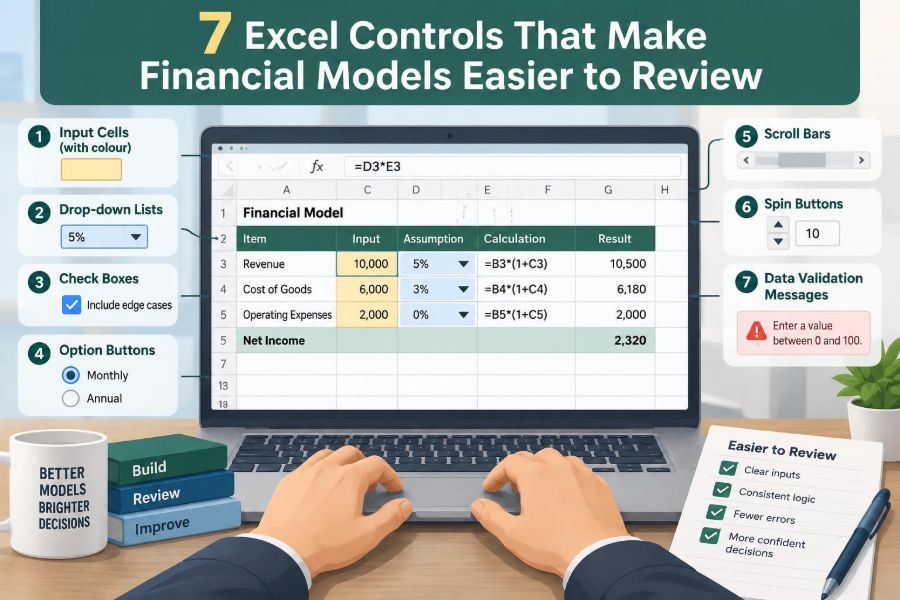
A consistent visual convention is one of the simplest controls in Excel. For example, use one fill colour for hardcoded inputs, another for formulas, and a third for links to other sheets or files.
The exact colours matter less than consistency and explanation. Put the convention near the front of the workbook and apply it everywhere, including smaller support schedules.
An input convention reduces the risk that a reviewer edits a formula while believing it is an assumption. It also directs review effort toward the cells where judgement has entered the model.
🔑 4. Keep hardcodes out of formulas
A formula such as =Revenue*1.03 may calculate correctly, but the 3% assumption is hidden. A reviewer cannot easily identify it, compare it with approved assumptions, or change it for a scenario.
Place the growth rate in a clearly labelled input cell and refer to that cell in the formula. The formula then becomes something like =Revenue*(1+Growth_Rate), using either a cell reference or a carefully governed named range.
This approach makes assumptions visible, reusable, and testable. It also reduces the chance that the same assumption is entered differently in several formulas.
🏷️ 5. Label inputs with units, timing, and source
A number alone is rarely a complete assumption. A reviewer needs to know whether 12 means 12%, 12 days, 12 million currency units, or a value applicable to a particular month.
Every material input should have a meaningful label, an appropriate number format, and a stated period or effective date where relevant. A short source note is useful when the value comes from a contract, management instruction, published data, or a separate calculation.
Useful input labels include
- Currency and scale, such as “Currency units” or “$m”
- Time basis, such as monthly, annual, or year-end
- Whether an amount is nominal or real
- The source or owner of the assumption
Clear labels prevent a surprising number of interpretation errors. 🔎
🧱 6. Separate inputs, workings, and outputs
A sheet that mixes assumptions, long calculations, and management outputs forces the reviewer to jump constantly between tasks. A more reviewable model separates these functions, whether through dedicated sheets or clearly divided areas on a small workbook.
Inputs should be easy to locate. Workings should show the calculation chain. Outputs should present the measures used for decisions, with enough context to understand them without searching through formulas.
This is not a rigid rule that demands dozens of tabs. The principle is to make the flow of information obvious: input to calculation to output to check.
✅ 7. Control two: apply data validation to controlled inputs
Data validation restricts or guides what users can enter in a cell. It is particularly helpful for inputs with a known range, fixed set of choices, required date, or whole-number requirement.
For instance, a tax rate assumption could be restricted to a sensible range, while a scenario selector can use a drop-down list. A reporting date can be required to be a valid date rather than a text string that looks like one.
Validation is a preventive control. It addresses a mistake at the point of entry instead of relying on a reviewer to discover it later.
📋 8. Use drop-down lists for categorical choices
Scenario names, entity selections, currencies, accounting treatments, and status labels are common candidates for lists. A controlled list prevents small spelling differences from creating different categories that look the same to a reader.
Keep the source list visible on a controlled assumptions or setup area, rather than embedding a long list inside a validation rule. The reviewer can then see the available choices and assess whether they are current.
Do not use a drop-down just because Excel allows it. A list with dozens of unclear choices can hide the decision instead of clarifying it.
🚧 9. Set sensible validation bounds, not artificial certainty
Numeric validation can stop obvious errors, such as a negative unit volume where negative values are impossible. But bounds should reflect a real business or technical constraint, not a guess about what seems normal.
An overly narrow range may block a valid but unusual assumption. An overly broad range provides little protection. Where uncertainty is genuine, allow the input and use a separate reasonableness flag to draw attention to it.
Validation messages should be brief and practical. Tell the user what values are expected and where to find the underlying assumption policy.
⚠️ 10. Remember what data validation cannot do
Data validation is useful, but it is not a complete safeguard. Cells can be pasted over, rules can be removed, and a value can be valid in format while still being inappropriate in context.
A valid 15% discount rate might still be wrong for the model’s intended scenario. A valid date might still use the wrong reporting period. That is why validation needs reconciliation and reasonableness checks.
Reviewers should inspect important validation rules, especially when a workbook has been copied, adapted, or consolidated from several sources.
🔒 11. Control three: protect formulas deliberately
Formula cells are vulnerable when a model is distributed to users who need to update assumptions but should not change calculations. Sheet protection can reduce accidental overwriting by locking formulas and leaving intended input cells unlocked.
Protection works best after the workbook has been designed with clear input areas. Locking everything creates frustration; unlocking everything removes the benefit. The goal is controlled editability.
Before protecting a sheet, test the actual user journey. A person should be able to enter approved assumptions, refresh permitted content where applicable, and read outputs without encountering unnecessary barriers.
🧩 12. Protect the structure as well as the cells
Workbook structure protection can help prevent accidental deletion, movement, hiding, or renaming of sheets. This is valuable when formulas depend on stable tab names and when a review pack uses a defined layout.
It is not a substitute for access controls, secure storage, or appropriate permissions. Excel protection is mainly an operational control against accidental changes, not a complete security solution for sensitive information.
Use protection proportionately. A simple personal analysis may need little beyond disciplined saving, while a recurring reporting model used by several people may need stronger governance.
🧪 13. Test protection from the user’s perspective
A protected workbook can fail in two opposite ways. It may be so restrictive that users create uncontrolled copies, or so permissive that important formulas remain exposed.
Ask a representative user to perform routine tasks in a fresh copy. Can they update inputs? Can they understand which cells are editable? Do protected areas produce a useful prompt rather than confusion?
- Test input entry.
- Test scenario selection.
- Test copying an approved reporting period.
- Test whether key formulas remain locked.
This small exercise often reveals design issues that the model author no longer notices.
🚨 14. Control four: build visible formula error checks
Excel errors such as #DIV/0!, #N/A, and #REF! should not be left for a reviewer to find by scrolling through every sheet. Create a prominent control area that reports whether significant errors exist.
A check can test critical ranges for errors or compare expected conditions against actual results. The exact formula depends on the layout, but the reporting principle is simple: exceptions should be visible in one place.
A red or clearly labelled “FAIL” should prompt investigation. Avoid presenting a failed control as a subtle formatting change that can be missed.
🧯 15. Do not hide errors with IFERROR by default
IFERROR can be appropriate when a known, harmless intermediate condition occurs. For example, a ratio may be intentionally blank before its denominator is available.
However, wrapping every formula in IFERROR(...,0) can turn a broken reference into a plausible-looking zero. That makes a model appear stable while concealing the evidence a reviewer needs.
Use error handling with intent. Where an error is expected, explain the treatment. Where an error signals a broken dependency, let the control framework reveal it.
🧮 16. Use check cells that state the condition
A useful check does more than calculate a difference. It identifies what should be true and whether it is true. For example, a check label might read “Closing cash agrees to cash flow statement,” followed by a difference and a PASS or FAIL status.
Prefer formulas that compare against a small tolerance where rounding is expected. The tolerance should be explicit and appropriate to the model’s scale, rather than an unexplained large amount that masks problems.
Place detailed check calculations near the relevant schedule and summarise their status on a central review sheet.
🔗 17. Control five: reconcile linked financial statements
Financial models often contain relationships that must hold if the logic is complete. The balance sheet should balance. Ending cash on the cash flow statement should agree to the balance sheet cash balance. Retained earnings should reflect profit and distributions according to the model’s design.
These relationships are powerful controls because they test several parts of the model at once. A balance sheet that does not balance may indicate an error in a schedule, a sign convention, a missing link, or an incomplete accounting treatment.
Build the reconciliation visibly rather than assuming the relationship is obvious from the numbers.
🧾 18. Reconcile schedules to their destination lines
Supporting schedules should reconcile to the financial statements or outputs they feed. A depreciation schedule should tie to depreciation expense and the relevant asset balances. A debt schedule should tie to interest, borrowings, and financing cash flows.
This control is especially helpful after a model is extended with a new facility, asset class, acquisition, or forecast period. The schedule may calculate, but its final link can still be wrong.
Common schedule reconciliations
- Working capital schedules to operating cash flow
- Fixed asset schedules to depreciation and asset balances
- Debt schedules to interest expense and closing debt
- Equity schedules to equity balances and distributions
🔄 19. Check roll-forwards period by period
A roll-forward gives reviewers a compact way to test movement through time: opening balance plus additions less reductions equals closing balance. It is useful for assets, debt, inventory, provisions, deferred items, and many other balances.
Use consistent signs and labels so that the logic is easy to trace. A roll-forward that works only after mental sign reversals is harder to review and more vulnerable to error.
Period-by-period checks matter because an annual total can reconcile even when individual months or quarters are mis-timed.
📈 20. Control six: add reasonableness checks
Reconciliations test whether parts of the workbook agree with one another. Reasonableness checks ask a different question: does the outcome look plausible in light of the underlying business logic?
Examples include gross margin trends, revenue per unit, employee cost per employee, days sales outstanding, inventory turns, leverage measures, and effective tax rates. The right measures depend on the model and industry.
A reasonableness check is an alert for investigation, not proof of an error. An unusual ratio may be correct because the scenario is unusual.
📊 21. Compare trends, not just single-period outputs
A model can produce a plausible forecast in one year while containing a timing error that becomes clear only across several periods. Trend reviews are therefore valuable for revenue, margins, capex, headcount, working capital, debt, and cash.
Look for discontinuities that are not explained by an assumption or event. Sudden jumps, reversals, flat lines, and repeated values can reveal broken formulas, copied inputs, or unintended circularity.
Simple charts can help during review, but a well-labelled row of growth rates or ratios is often enough. The aim is to make changes through time visible.
🎯 22. Test scenario logic and sensitivities
Where a model includes scenarios, changing the scenario should change only the assumptions and consequences intended by the design. A scenario selection control should not leave one input behind on the old case or overwrite a formula unexpectedly.
Test a small set of meaningful movements. Increase a cost driver, reduce volume, change a collection period, or alter a financing assumption, then observe whether affected outputs respond in the expected direction.
This is sometimes called a directional or “smell” test. It does not replace formula review, but it can expose links that are missing, reversed, or duplicated.
📝 23. Control seven: document the model’s purpose and boundaries
A reviewer needs context before reviewing mechanics. Include a concise cover or guide sheet stating the model’s purpose, reporting currency and scale, period covered, key outputs, major assumptions, and known limitations.
Also explain the intended update process. If historical actuals are pasted from another system, identify the destination area and the checks that should be run afterward. If a scenario is selected from a list, explain which outputs are affected.
Documentation does not need to be a long manual. It needs to answer the questions a new user would otherwise ask the author.
🗂️ 24. Maintain a focused change log
A change log provides an audit trail for material updates. Record the date, person making the change, area affected, reason, and whether relevant checks were completed.
Not every formatting adjustment needs a formal entry. Focus on changes that alter assumptions, formulas, structure, sources, logic, or decision-relevant outputs.
A useful log also helps reviewers distinguish a genuine new issue from an expected consequence of a documented revision. It supports continuity when responsibility for the workbook changes hands.
💾 25. Use version discipline outside the workbook too
Even a good internal change log cannot solve confusion caused by files called “Final,” “Final2,” and “Final_revised.” Establish a clear naming convention and store the authoritative version in an agreed location.
Where organisational tools provide version history or controlled access, use them in line with internal policy. The practical objective is that reviewers can identify which file is current and recover an earlier version when necessary.
Version discipline is a control over process, not just file names. It prevents teams from reviewing or distributing obsolete outputs.
🧹 26. Create a compact review dashboard
A central review dashboard should bring together the model’s most important control results. It can show the version, reporting date, selected scenario, key assumptions, balance checks, error status, and exceptions requiring attention.
Keep it concise. A dashboard crowded with every possible metric becomes another complex sheet to review. Prioritise checks that would change a reviewer’s confidence in the model or require action before use.
Make statuses unambiguous: PASS, FAIL, WARNING, or NOT APPLICABLE. A blank cell should not leave the reviewer guessing whether a check was omitted or passed.
🔍 27. The core principle: make exceptions easy to see
The core principle behind all seven controls is simple: a reviewer should be able to distinguish normal operation from an exception quickly. Clear inputs reveal judgement. Validation prevents avoidable entry mistakes. Protection preserves formulas. Checks expose failures. Documentation explains change.
Controls should be proportionate to the model’s purpose, complexity, and consequences. A short planning model may use a lighter version of this framework, while a recurring or high-impact model warrants more formal testing and ownership.
A reviewable financial model does not ask people to trust it blindly; it gives them structured ways to test it. Build those routes into the workbook from the first assumption, and review becomes faster, clearer, and more reliable. 🛠️ ✅ 🔍