
A finance team is preparing a budget pack for management. The totals look reasonable, the charts refresh, and the deadline is close. Then someone notices that depreciation has stopped flowing into one business unit after a new column was inserted.
The mistake may be small, but the consequences are not. A broken formula can alter profit, cash flow, covenant calculations, valuation outputs, or a decision about hiring and investment. The more polished a spreadsheet looks, the easier it can be to assume that it is working.
Financial models are not reliable because they contain many formulas. They become more reliable when they can test their own logic and clearly tell a reviewer where that logic may have failed.
Model checks and error flags provide that discipline. They turn a workbook from a collection of calculations into a system that actively searches for inconsistencies, missing links, impossible results, and assumptions that deserve attention.
🧭 What spreadsheet reliability actually means
Reliable does not mean error-free forever. Assumptions change, source data is updated, and models are often modified under time pressure. Reliability means the workbook produces outputs that are consistent with its intended design and makes problems visible quickly.
A reliable financial spreadsheet should be understandable, traceable, and reviewable. A user should be able to identify what drives an output, where key data came from, and whether core accounting relationships still hold.
🔎 Why financial models are unusually vulnerable
Financial spreadsheets combine several sources of risk: manual inputs, copied formulas, linked tabs, timing conventions, accounting rules, and judgment-based assumptions. A formula can be mathematically valid while still applying the wrong business logic.
For example, a growth formula may continue calculating after a column is copied, but reference last year’s sales rather than the intended prior month. Excel does not know the business meaning of the reference; it only follows the instruction it receives.
🧱 A model check is a test, not a substitute for judgment
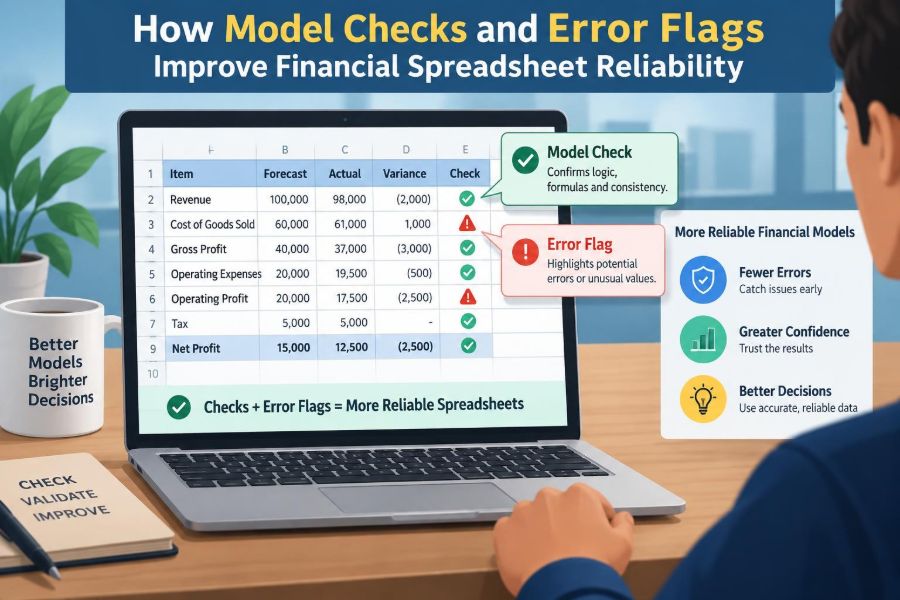
A model check is a formula or procedure that compares an expected relationship with the model’s actual result. If the relationship does not hold, the check reports a difference or an alert.
Checks do not prove that every assumption is sensible. A revenue forecast can pass every mechanical check and still be unrealistic. Their job is narrower and valuable: catch internal inconsistency, broken construction, and unexpected outcomes before a decision relies on them.
🚩 Error flags translate failures into visible signals
An error flag is the message produced when a check falls outside an acceptable condition. It might display “OK” and “CHECK,” a red indicator, a non-zero difference, or a count of unresolved issues.
The best flags are specific enough to direct action. “Model error” creates a hunt. “Balance sheet does not balance: cash flow link may be incomplete” gives the reviewer a useful starting point.
🧮 The balance sheet check is the essential foundation
For most integrated financial models, the most recognizable check is:
Total Assets - Total Liabilities - Total Equity = 0If the result is not zero, the model is not fully integrated or one side of the accounting equation has been misstated. A common flag is:
=IF(ABS(Assets-Liabilities-Equity)<0.01,"OK","CHECK")The small tolerance handles rounding. It should not become a way to hide material differences. A large tolerance can convert a valuable control into decoration.
💵 Cash flow reconciliation catches broken links
Ending cash on the balance sheet should ordinarily reconcile to beginning cash plus net movement in cash from the cash flow statement. This check is especially useful because cash is often linked across operating schedules, financing assumptions, and summary statements.
A failure may reveal a missing debt drawdown, an omitted dividend, a sign error in working capital, or a circularity workaround that no longer works as intended. It does not identify the exact cause, but it sharply narrows the search.
🔗 Schedule-to-statement checks protect integration
Major supporting schedules should tie directly to the financial statements. Fixed assets should reconcile to property, plant, and equipment; debt schedules to debt balances and interest expense; retained earnings to the equity statement.
These checks matter because models are often built in modules. Each tab can look correct independently while a link between them is missing, duplicated, or pointed at an old line item.
| Schedule | Typical reconciliation | Common failure |
|---|---|---|
| Fixed assets | Closing asset balance to balance sheet | Depreciation or capital expenditure omitted |
| Debt | Closing debt and interest expense | Repayment timing or interest base is wrong |
| Working capital | Balance movements to cash flow | Sign convention is reversed |
| Equity | Retained earnings to balance sheet | Dividends or net income is not linked |
↔️ Roll-forward checks test movement over time
A roll-forward tests whether a closing balance follows logically from the opening balance and the period’s movements. The generic form is:
Opening balance + additions - reductions = closing balanceInventory, debt, deferred revenue, lease liabilities, share capital, and fixed assets are all suitable candidates. The check is powerful because it reflects the way many real financial balances evolve rather than merely comparing two displayed totals.
📅 Timing checks expose period misalignment
Many spreadsheet errors are timing errors. A model may recognize a cost one month early, begin depreciation before an asset is in service, or calculate interest on a year-end balance rather than an average or opening balance.
Timing checks compare events to dates and periods. A simple rule might flag depreciation before the capital expenditure date, revenue before a contract start date, or debt repayment after maturity. These checks are particularly useful in monthly models where an incorrect column reference can remain unnoticed for many periods.
➕ Formula consistency checks find copy-and-paste damage
Horizontal and vertical formula consistency is a practical defense against accidental overwriting. In a forecast row, the formulas should usually follow a consistent pattern as they move across periods.
A reviewer can use formula-view tools, compare neighboring cells, or create checks that identify text or hardcoded numbers inside regions intended for formulas. The goal is not to ban all exceptions; it is to make deliberate exceptions obvious and documented.
🔢 Hardcode flags separate assumptions from calculations
Hardcodes are not inherently bad. Assumption cells need values entered by a user. The problem occurs when a hardcoded number appears inside a calculation range and silently replaces a formula.
A clean model usually distinguishes inputs, calculations, and outputs through consistent layout and formatting. A hardcode flag adds a more dependable layer: it tests whether cells expected to contain formulas still do so. This is especially useful after a workbook has passed through multiple hands.
🧾 Input validation stops bad data at the door
Model checks are often detective controls: they find an error after entry. Input validation is preventive: it limits what can be entered in the first place.
A percentage assumption can be constrained to a sensible range, a reporting month can be selected from approved dates, and a category can be chosen from a defined list. Validation cannot determine whether a forecast is commercially sensible, but it can prevent obvious format and selection mistakes.
📏 Reasonableness checks ask whether outputs make sense
Reconciliations test whether numbers fit together. Reasonableness checks ask whether they fit the business. Examples include margin movement, revenue per employee, days sales outstanding, inventory days, interest coverage, and capital expenditure as a proportion of sales.
These metrics should not be treated as universal pass-or-fail rules. A sharp change may be entirely legitimate after an acquisition, price change, or seasonal shift. The flag should prompt an explanation, not automatically reject the result.
📈 Trend checks reveal unexpected jumps
A trend check compares a period with prior periods or a budget. It can flag unusually large movements in revenue, headcount, gross margin, working capital, or cash balances.
For a hypothetical example, if payroll expense falls sharply while headcount is unchanged, the issue may be a missing salary escalation formula, a vacant role assumption, or a legitimate restructuring. The check creates a focused question: what explains the movement?
⚖️ Sign checks prevent direction mistakes
Sign convention is one of the most persistent sources of spreadsheet error. A cash outflow may be stored as negative in one schedule but added as though it were positive in another. The resulting output can look plausible while being materially wrong.
Checks can test expected directions: debt balances should generally not be negative unless the model intentionally treats net cash as negative debt; depreciation expense should not increase fixed assets; a liability repayment should reduce the liability. Define exceptions explicitly rather than relying on memory.
🪙 Zero, blank, and missing-data checks are different
A zero may be a valid economic result. A blank may mean data has not arrived, an input was omitted, or a formula returned an empty string. Treating them as identical obscures useful information.
Design flags that distinguish “zero activity,” “not applicable,” “pending input,” and “broken reference.” For example, a blank tax rate may deserve a warning, while a zero tax rate may be appropriate for a loss-making entity in a simplified forecast.
🔄 Circularity requires deliberate control
Circularity occurs when formulas depend on each other, such as interest expense affecting debt, while debt depends on cash flow after interest. Some financial models manage this with iterative calculation or controlled switches.
Because circularity can make results sensitive to settings and starting values, include a check confirming that the intended calculation mode is active and the model has converged. If an approximation is used instead, label it clearly and test whether it remains appropriate for the model’s purpose.
🧠 Checks should reflect the model’s purpose
A three-statement operating forecast, a project finance model, and a valuation model need different controls. A project finance model may require construction-completion, reserve-account, and debt-service checks. A valuation model may focus more on terminal value assumptions, discount periods, and enterprise-value-to-equity-value bridges.
Copying a generic checklist is a useful starting point, not a complete solution. The most effective checks arise from asking: “What must be true for this output to be meaningful?”
🧩 Layer controls rather than relying on one grand check
A single dashboard saying “model OK” is convenient but insufficient. One check can pass while a local schedule contains an error that happens to offset elsewhere.
Use layers: cell-level input controls, schedule reconciliations, statement checks, reasonableness tests, and a summary dashboard. This approach resembles a building inspection: checking the front door does not establish that the wiring and foundations are sound.
🎛️ Design a readable checks dashboard
A checks dashboard should summarize the health of the model without becoming another dense worksheet. Place it in a consistent location and display the check name, status, magnitude of any difference, and where to investigate.
- Group checks by area: statements, operating schedules, debt, tax, and valuation.
- Show material differences, not only red or green labels.
- Use clear status language such as “Pass,” “Review,” and “Fail.”
- Avoid relying on colour alone; labels remain readable when printed or viewed by users with colour-vision differences.
Conditional formatting can support the dashboard, but the underlying formula and explanation matter more than the colour.
🚦 Use tolerances carefully
Rounding, unit conversions, and imported data can create minor differences. A tolerance avoids flooding the reviewer with immaterial alerts. Yet every tolerance is a judgment about what difference is acceptable.
Set tolerances in relation to the model’s units and purpose. A rounding tolerance for a model displayed in millions will differ from one used to calculate a transaction payment. Record the rationale where the threshold could affect interpretation.
📝 Make flags actionable, not merely alarming
“ERROR” is better than silence, but it is rarely enough. A useful flag describes the failed relationship and, where possible, identifies the affected period or schedule.
For instance, “Working capital cash flow differs from balance movement in FY27” is more useful than “check 14 failed.” A reviewer still needs to investigate, but the flag reduces the time spent locating the issue.
🧪 Test the controls by breaking the model safely
A check that has never been challenged may not work as expected. During model development, intentionally change a test input, remove a link in a copy of the file, or alter a formula to confirm that the appropriate flag turns on.
This is control testing, not careless editing. Work in a controlled copy, document the test where relevant, and restore the intended formula. It demonstrates whether the check detects the kind of failure it was designed to catch.
👥 Independent review sees what the builder misses
Model builders become familiar with their own layout and assumptions. That familiarity is efficient, but it can also create blind spots. An independent reviewer is more likely to challenge a hidden hardcode, an unexplained override, or a formula that is consistent but conceptually wrong.
Review does not require a large formal audit for every workbook. Even a colleague tracing key outputs back to sources and checking the dashboard can add meaningful challenge before a high-stakes file is used.
📚 Documentation gives checks their context
A check is less useful if nobody knows what it is testing or why it exists. Document the model’s purpose, key assumptions, sign conventions, input sources, calculation choices, and known limitations.
For important flags, note the expected condition, tolerance, owner, and response when it fails. Documentation is especially valuable when a model changes hands or is reopened months later under a deadline.
🛠️ Common weak approaches to avoid
Some controls create a reassuring appearance without much protection. A dashboard with dozens of unexplained green boxes can discourage rather than support review.
- Checking only totals: an offsetting error can leave a total unchanged.
- Hiding errors with IFERROR: it may suppress a visible formula failure while leaving an incomplete calculation.
- Using vague labels: a reviewer cannot efficiently investigate “miscellaneous check.”
- Overloading users with alerts: too many low-value flags lead to alert fatigue.
- Leaving failed checks unresolved: an accepted exception should be explained, not ignored.
⚠️ An error flag is not proof that the model is wrong
A flag signals a condition worth investigating. It may identify a genuine formula error, a valid business exception, an incomplete input, or a control that no longer matches the model’s design.
Likewise, a passing flag is not proof that the model is right. Two incorrect formulas can reconcile to each other. This limitation is why checks must sit alongside clear assumptions, source-data review, analytical judgment, and proportionate independent challenge.
🏗️ Build checks as the model is built
Adding controls at the end of a project is possible, but it is less efficient. Build a schedule, add its roll-forward; create a statement link, add its reconciliation; introduce an input, decide how it will be validated.
This habit reduces retrofitting and improves model architecture. It also encourages the builder to state the expected relationship clearly, which often exposes ambiguity before it becomes a formula problem.
📌 A practical sequence for improving an existing workbook
If a workbook has few controls, do not try to create every possible check at once. Start with the relationships that could most seriously mislead the intended user.
- Map the workbook’s key inputs, schedules, statements, and outputs.
- Add balance sheet, cash flow, and major schedule reconciliations.
- Identify critical assumptions and apply input validation or clear input areas.
- Add trend, sign, and reasonableness checks for material drivers.
- Create a visible checks dashboard with clear ownership.
- Test representative failures and refine alerts that are unclear or noisy.
The result should be a manageable control framework, not an obstacle course for routine users.
🎯 The core principle: make errors easier to detect than to ignore
Financial spreadsheet reliability depends on more than careful formula writing. It depends on designing the workbook so that expected accounting relationships, timing rules, and business logic are tested continuously.
Well-designed model checks identify where to look. Clear error flags make the issue visible. Thoughtful review determines whether the result is a defect, an accepted exception, or a question about the underlying business assumption.
The strongest financial models do not claim to be flawless; they make inconsistencies visible early enough for people to understand and correct them. That is the practical value of checks and flags: more transparent analysis, more focused review, and decisions made with a clearer view of the model’s condition. 📊🔍✅