
A café owner closes late on Friday, counts the till, checks a stack of supplier invoices, and tries to remember which customers still owe money. None of these tasks is conceptually difficult. Together, they can consume an evening—and still leave room for a misplaced receipt or a transposed number.
Now picture the same business using a card reader connected to accounting software. Sales arrive automatically, invoices are scanned, bank transactions are matched, and a dashboard estimates next month’s cash position. The owner has not escaped accounting; the work has changed from copying information to interpreting it.
That shift is the story of financial automation. It affects students learning debits and credits, accountants closing the books, managers planning payroll, and anyone who relies on a financial report to make a decision.
Automation can make financial information faster, more complete, and easier to analyze. But it can also spread errors at speed when controls are weak. Understanding how financial systems evolved helps us use modern tools without treating them as a black box.
📜 The Paper Ledger Was a Control System
Before software, the ledger was the central record of a business’s financial life. Clerks entered transactions by hand into journals and account books, then totaled balances at regular intervals.
This process was slow, but it created a visible trail. An invoice, receipt, journal entry, and ledger posting could be followed by a reviewer. The discipline of double-entry bookkeeping—recording equal debit and credit effects—made it possible to check whether books were mathematically in balance.
Paper systems were not primitive simply because they were manual. They established enduring ideas: evidence, authorization, classification, reconciliation, and review.
✍️ Why Manual Accounting Reached Its Limits
Handwritten records work reasonably well for a small volume of simple transactions. They become strained when a business has multiple locations, many products, recurring payroll, foreign currencies, or thousands of customer balances.
Manual work introduces several bottlenecks:
- Data must be copied repeatedly from one document or book to another.
- Calculations and summaries take time at the end of each period.
- Corrections may require tracing several related entries.
- Management receives historical information after the opportunity to act may have passed.
The problem was not only labor cost. Delayed information makes cash, inventory, and credit decisions less reliable.
🧮 Mechanical Calculation Changed the Pace
Adding machines, calculators, and tabulating equipment reduced some arithmetic work long before modern accounting applications existed. They did not decide how to classify a transaction, but they made totaling and checking faster.
This distinction matters. Early automation often targeted a narrow, repeatable task: calculate, sort, print, or total. Financial systems became more powerful only when these tasks were connected to structured records and accounting rules.
A calculator speeds up a clerk. A system changes the flow of information between people and processes.
🖥️ Mainframes Centralized Financial Data
Large organizations later adopted mainframe-based systems for high-volume activities such as payroll, billing, inventory, and bank processing. Data was often entered in batches and processed on a schedule rather than updated continuously.
Centralization brought consistency. A company could apply the same account codes, payroll rules, and reporting format across departments. Yet access was limited, changes were often handled by specialists, and reports could still arrive after a processing run.
Batch processing remains relevant. Many systems still process certain transactions in scheduled groups because it can be efficient and easier to control.
📊 Spreadsheets Put Analysis on Every Desk
Spreadsheets made financial modeling accessible to accountants and managers without requiring a programmer for every calculation. A user could build a budget, variance analysis, loan schedule, or forecast directly from a desktop computer.
They remain valuable because they are flexible and transparent when designed well. A reviewer can inspect formulas, assumptions, and source data more easily than in some complex applications.
But flexibility creates risk. A copied formula, hidden row, hard-coded amount, or outdated file can materially alter a result. Spreadsheets are excellent analytical tools; they are less dependable as uncontrolled systems of record.
🗄️ Databases Created a Shared Source of Truth
A database stores structured information so many users and applications can retrieve and update it according to defined rules. Instead of maintaining separate lists for customers, invoices, and inventory, a business can connect them through common identifiers.
This supports the idea of a single source of truth: one authoritative record for a given item of data. If a customer’s address changes, the goal is to update it once and use that approved version everywhere.
A shared database does not guarantee accuracy. It does, however, reduce the need to reconcile numerous disconnected copies of the same information.
🔗 Enterprise Systems Connected Business Functions
Enterprise resource planning, often called ERP, brought finance together with purchasing, sales, inventory, manufacturing, and human resources. A purchase order can lead to a goods receipt, supplier invoice, payable entry, and payment record within linked workflows.
The advantage is not merely convenience. When operational events feed financial records, managers can compare financial results with the activity that produced them: units shipped, hours worked, materials used, or orders returned.
ERP implementations can be difficult because they require agreement on processes and data definitions. Installing software without resolving those choices simply automates inconsistency.
🔄 Transactions Became Digital Events
Modern systems increasingly capture transactions at their source. A point-of-sale system records a sale, an online store receives an order, or an employee submits an expense through an app.
Each event can generate data that flows into accounting through rules and integrations. For example, a sale may create revenue, tax, a payment receivable or cash receipt, and an inventory reduction, depending on the business model and system design.
Automation works best when the underlying event is captured accurately. Bad product codes, duplicate orders, or incorrect tax settings can create accounting consequences downstream.
🏦 Bank Feeds Reduced Repetitive Entry
Bank feeds import transaction data from a financial institution into accounting software. This reduces manual entry and helps businesses reconcile accounts more frequently.
Importing a bank transaction is not the same as proving the accounting treatment is correct. A payment to a supplier may need to clear an existing payable; a new expense category may require review; and a transfer between accounts should not be counted as income.
The bank statement remains an independent record used in reconciliation. The feed makes comparison faster, but it does not eliminate the need to investigate differences.
🧾 Optical Capture Turned Documents into Data
Document capture tools use optical character recognition, or OCR, to read text from receipts, invoices, and statements. They can extract dates, vendor names, amounts, and invoice numbers into a digital workflow.
OCR is especially useful when employees submit many receipts or when accounts payable teams process standardized supplier invoices. It reduces typing, supports searchable records, and can attach evidence to the transaction.
Recognition is not understanding. A tool may misread a faded image, confuse an invoice total with a subtotal, or select the wrong vendor when names are similar. Review rules remain necessary.
⚙️ Rules Engines Automated Routine Decisions
Many accounting systems use rules to assign categories, tax codes, approvers, or account mappings. A recurring rent payment, for instance, may be coded to the same expense account each month after approval.
Rules are deterministic: if stated conditions are met, the system performs a stated action. This makes them useful for stable, repetitive patterns where the business can define a clear policy.
A good rule has an owner, a clear purpose, and periodic testing. An old rule can continue posting transactions long after a vendor, contract, or business practice has changed.
🤖 Robotic Process Automation Filled Workflow Gaps
Robotic process automation, or RPA, uses software bots to perform repetitive actions across applications. A bot might download reports, copy approved data into a legacy system, or assemble support for a reconciliation.
RPA can help where systems cannot easily exchange data through an integration. It is often a practical bridge, not a permanent cure for fragmented technology.
Bots can be fragile because they may depend on screen layouts, file names, or login steps. If a process changes, the bot can fail silently unless monitoring and exception reporting are in place.
☁️ Cloud Platforms Changed Access and Updates
Cloud accounting platforms deliver software through internet-connected services rather than relying solely on a company-managed local installation. Users can often access current records from different locations, subject to their permissions.
Cloud delivery can simplify collaboration and allow providers to release updates more regularly. It also makes vendor selection, data access, cybersecurity practices, and service continuity central governance concerns.
A business should understand where its data is stored, how it can be exported, who can access it, and what happens if a service is unavailable. Convenience does not remove accountability.
🔌 APIs Made Systems Communicate
An application programming interface, or API, is a defined method that allows software systems to exchange data or request actions. APIs can connect accounting platforms with payment processors, payroll providers, e-commerce stores, and reporting tools.
Well-designed integrations reduce rekeying and can preserve detail that would otherwise be summarized too early. For example, an online sales platform may pass order identifiers, taxes, refunds, and fees to the accounting system.
Integration requires design choices. Teams must decide which system owns each field, how duplicates are prevented, how errors are reported, and how changes are approved.
🧭 Master Data Determines the Quality of Automation
Master data is the relatively stable reference information used across transactions: chart of accounts, customer records, supplier records, product codes, departments, and tax settings.
If two departments use different customer identifiers or product names, automated reporting can fragment. The system may treat one real-world customer as two records, or post similar expenses to unrelated accounts.
Master-data governance sounds administrative, but it is a financial control. Clear naming standards, restricted editing rights, duplicate checks, and periodic cleanup make automated reports more trustworthy.
📚 The Chart of Accounts Became a Data Model
The chart of accounts is the organized list of accounts used to classify transactions. In an automated environment, it often carries dimensions beyond the account name, such as department, project, location, product line, or legal entity.
Those dimensions make reporting more useful. Instead of asking only, “How much did we spend on travel?” a manager can ask which team, project, or location incurred the cost.
More detail is not automatically better. An oversized chart of accounts burdens users and creates inconsistent coding. Use dimensions when they answer recurring management or reporting questions.
✅ Controls Must Move Into the Workflow
When paper steps disappear, controls cannot remain dependent on physical signatures or a manager’s memory. They need to be embedded in roles, approvals, validations, and audit logs.
Common digital controls include:
- Role-based access that limits users to necessary functions.
- Approval thresholds for purchases, payments, or journal entries.
- Required fields and validation checks before posting.
- Segregation of duties, so one person cannot initiate, approve, and conceal a transaction alone.
- Logs that record who changed data and when.
Controls should be proportionate. A small business may use compensating reviews where strict role separation is impractical, while a larger organization can configure more formal workflows.
🔍 Reconciliation Remains Essential
Automation changes reconciliation from a manual matching exercise into a review of system-generated matches and exceptions. It does not make reconciliation obsolete.
A bank balance, payment processor settlement, inventory count, or subsidiary ledger can disagree with the general ledger for valid timing reasons or for real errors. Reconciliation identifies the difference, explains it, and ensures it is resolved or documented.
Think of automated matching as a first pass. The value comes from investigating what did not match and understanding why.
🧪 Exception Handling Separates Automation from Autopilot
No financial process is entirely routine. Duplicate invoices, partial deliveries, refunds, unusual exchange rates, and corrected payroll records all create exceptions.
Strong automation routes exceptions to the right person with enough context to decide. Weak automation hides them in queues, bypasses review, or forces staff to fix symptoms manually every month.
A useful design question is: What happens when the expected pattern is broken? If there is no answer, the process is not ready for hands-off operation.
📈 Real-Time Data Is Not the Same as Real-Time Insight
Dashboards can show sales, cash receipts, outstanding invoices, and expenses with little delay. That speed can improve operational decisions, particularly when teams need to respond to demand or cash pressure.
But a current dashboard may still contain incomplete or unreviewed data. Accruals may not be posted, returns may be pending, and account mappings may be wrong. “Real time” describes availability, not necessarily finality.
Users should know whether a report is operational, preliminary, or formally closed. The label changes how confidently a number should be used.
🔮 Forecasting Extends Accounting Into Planning
Traditional financial statements mainly describe what has already happened. Forecasting uses historical results, current operational signals, and stated assumptions to estimate what may happen next.
A simple cash forecast may begin with expected customer collections, scheduled payroll, supplier payments, loan obligations, and planned purchases. Its usefulness depends less on sophisticated mathematics than on realistic timing assumptions.
Forecasts are not promises. They are structured views of uncertainty that help managers prepare for possible outcomes.
🧠 Machine Learning Finds Patterns in Financial Data
Machine learning is a set of methods that learns patterns from examples rather than relying only on explicit if-then rules. In finance, it may help classify expenses, detect unusual transactions, estimate late-payment risk, or support demand and cash forecasting.
Unlike a fixed rule, a model can identify relationships among many variables. For instance, it may recognize patterns in payment history, invoice size, customer segment, and seasonality when estimating collection timing.
The output is usually probabilistic, not certain. A model can flag a transaction as unusual; it cannot by itself establish that fraud occurred or determine the proper accounting conclusion.
🧩 AI Forecasts Depend on Inputs and Assumptions
AI-based forecasting can process larger and more varied data sets than a spreadsheet model. It may incorporate sales trends, order pipelines, seasonal patterns, inventory signals, or external data where appropriate and permitted.
Its limits are equally practical. A model trained on stable history may perform poorly after a major price change, new product launch, supply disruption, or shift in customer behavior. Past patterns are useful only when they remain relevant.
Finance teams should compare forecasts with business knowledge, document assumptions, monitor errors over time, and revise the model when conditions change. A polished chart should never replace judgment.
🛡️ Security and Privacy Are Financial System Requirements
Financial systems hold sensitive information: bank details, payroll data, customer records, invoices, and sometimes tax identifiers. Automation can increase the number of systems and connections handling that information.
Basic protections include strong authentication, careful user provisioning, timely removal of access, encrypted data transmission where available, backups, and review of third-party providers. Staff training also matters because phishing and social engineering can defeat technical safeguards.
Security is not solely an IT concern. Finance users who approve payments, maintain vendor records, or export reports are part of the control environment.
⚖️ Explainability Matters for Financial Decisions
A financial recommendation is easier to trust and challenge when users can understand the data and logic behind it. This is especially important for forecasts, anomaly flags, credit decisions, and automated journal suggestions.
Explainability does not require every user to understand model mathematics. It does require meaningful answers to practical questions: What data was used? Which assumptions matter? Who can override the result? How is performance checked?
When a system cannot be explained well enough for its risk level, it should not be given unchecked authority over consequential decisions.
👥 Accountants Are Moving From Entry to Interpretation
Automation reduces some repetitive posting and checking. It increases the value of people who can design processes, evaluate evidence, challenge unusual results, communicate implications, and connect financial data to operational reality.
This does not mean foundational accounting is less relevant. Understanding revenue, expenses, assets, liabilities, timing, and internal control is what allows a professional to recognize when an automated output makes no sense.
For students and working professionals, useful capabilities now include data literacy, spreadsheet discipline, system awareness, process mapping, and the confidence to ask how a number was produced.
🚧 Common Automation Mistakes to Avoid
The most expensive failures often begin with unrealistic expectations rather than defective software. Teams may automate a confusing process, rely on untested data, or remove review steps too early.
- Automating before simplifying: eliminate unnecessary approvals and duplicate entry first.
- Trusting default settings: tax rules, account mappings, and permissions require deliberate configuration.
- Ignoring change management: users need training and a clear explanation of the new workflow.
- Measuring speed only: track error rates, exceptions, close quality, and user adoption as well.
- Keeping no fallback: document how critical work continues during outages or integration failures.
Technology exposes process weaknesses quickly. Treat that exposure as an opportunity to improve the process rather than a reason to hide the issue.
🛠️ A Practical Path to Better Financial Automation
Organizations do not need to replace every system at once. A measured approach usually delivers more reliable results and gives teams time to learn.
- Map the current process from source document to final report.
- Identify repeated tasks, delays, error points, and key control risks.
- Standardize data definitions and approval policies before building automation.
- Start with a contained, high-volume use case such as invoice capture or bank reconciliation.
- Test normal transactions and exceptions using realistic examples.
- Assign ownership for rules, integrations, access, monitoring, and periodic review.
- Expand only after accuracy, controls, and user understanding are demonstrated.
The objective is not maximum automation. It is a process that produces timely, reliable information with appropriate human oversight.
🌱 The Core Principle: Automate Work, Preserve Accountability
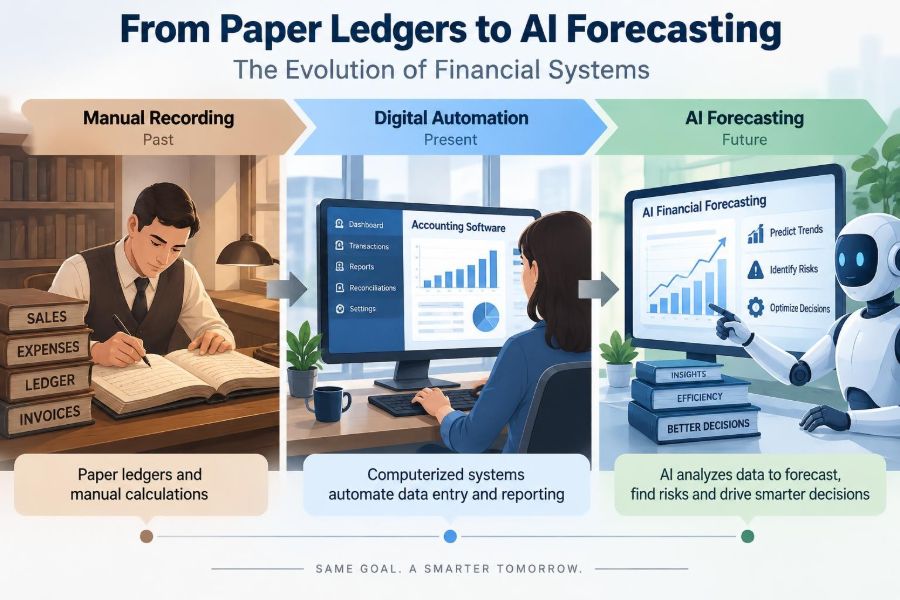
Financial systems have moved from handwritten records to connected platforms capable of classifying transactions, reconciling data, and generating forecasts. Each stage reduced a different form of friction: arithmetic effort, duplicate entry, delayed reporting, or limited analytical capacity.
Yet the essential accounting questions have not changed. Is the transaction real? Is it recorded in the right period and category? Is there evidence? Who approved it? Can the result be explained?
The strongest financial systems use automation to make routine work more reliable while keeping people accountable for judgment, controls, and consequences. That principle applies whether a business is organizing its first digital receipts or evaluating an AI-generated cash forecast.
Paper ledgers taught discipline; modern systems add speed, connection, and analytical reach. The best results come when technology handles repeatable work and informed people remain responsible for the meaning behind the numbers. 💰⚙️📈