
For many businesses, making a sale is only the beginning of the revenue process.
A company may deliver products or services today but allow the customer to pay 30, 45, 60, or even 90 days later. Until that payment arrives, the amount remains in accounts receivable, often abbreviated as AR. 📄💰
Managing those unpaid invoices can become difficult as a business grows.
Finance teams need to know:
- Which invoices are still outstanding
- Which customers are likely to pay on time
- Which accounts may become overdue
- How much cash is likely to arrive next week or next month
- Which customers should receive reminders
- Which payments correspond to which invoices
Traditionally, much of this work involved spreadsheets, manual follow-ups, bank-statement reviews, and individual judgment.
Modern automated accounts receivable systems can perform much of this work continuously.
They combine invoice data, payment history, customer behavior, accounting records, bank transactions, business rules, and sometimes machine-learning models to estimate when customers will pay and to track those payments from invoice creation through final settlement.
The basic idea is:
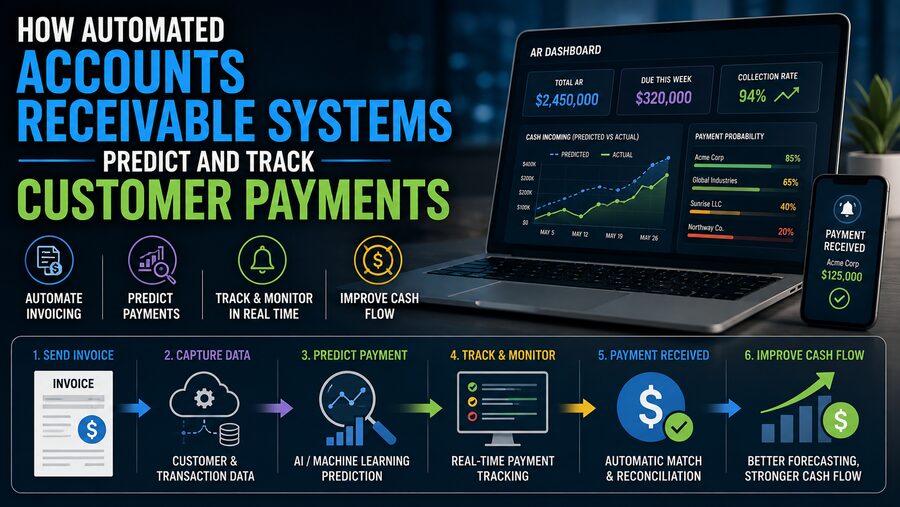
Invoice issued → payment behavior monitored → likely payment date predicted → reminders triggered → incoming payment identified → invoice reconciled. 🔄
This can improve cash-flow visibility, reduce manual work, and help finance teams focus their attention on the accounts that need it most.
📄 1. Accounts Receivable Begins With an Invoice
The process starts when a business creates an invoice.
An invoice commonly includes:
- Customer name
- Invoice number
- Invoice date
- Amount due
- Due date
- Payment terms
- Purchase-order number
- Currency
- Banking or payment instructions
Suppose a company sends a customer a $25,000 invoice on September 1 with payment terms of Net 30.
The nominal due date is October 1.
But that does not necessarily mean the customer will pay exactly on October 1.
Some customers consistently pay five days early.
Others routinely pay two weeks late.
An automated AR system tries to learn or model these behavioral differences. 🧠
⏰ 2. Due Date and Expected Payment Date Are Different
The due date comes from the contractual payment terms.
The expected payment date is an estimate of when the customer will actually send the money.
Consider two customers with identical Net 30 terms.
Customer A historically pays 27 days after invoice date.
Customer B historically pays 46 days after invoice date.
If both receive invoices today, a simple accounting system may show the same due date for both.
A predictive AR system may forecast very different cash-arrival dates.
That distinction is extremely useful for treasury and cash-flow planning. 📊
🧠 3. Payment Prediction Starts With Historical Behavior
One of the strongest signals of future payment behavior is often previous payment behavior.
The system may examine metrics such as:
- Average days to pay
- Median days to pay
- Frequency of late payments
- Amount of previous invoices
- Number of open invoices
- Payment method
- Historical disputes
- Partial-payment behavior
- Seasonal trends
Suppose a customer has paid 40 previous invoices.
If most were paid between 35 and 38 days after issuance, the next invoice is likely to follow a similar pattern unless other circumstances change.
The system can use this history to create a predicted payment window.
📈 4. Machine Learning Can Improve Payment Forecasts
More advanced AR platforms may use machine-learning models to estimate payment timing.
The model can evaluate many variables simultaneously.
Possible inputs include:
- Customer payment history
- Invoice amount
- Payment terms
- Customer industry
- Customer region
- Day of the week
- Invoice age
- Number of previous reminders
- Existing overdue balance
- Dispute history
- Historical payment variability
The output might be:
Predicted payment date: October 8
or a probability distribution such as:
- 60% chance of payment by October 5
- 82% chance by October 12
- 95% chance by October 25
This is more useful than treating every invoice as though it will be paid precisely on the contractual due date. 🎯
⚖️ 5. Risk Scores Help Prioritize Collection Effort
Automated AR systems may assign each invoice or customer a payment-risk score.
For example:
Low risk 🟢
Historically pays on time.
Medium risk 🟡
Occasionally late or currently carrying a larger balance.
High risk 🔴
Frequently overdue, disputed invoices, or deteriorating payment behavior.
Finance teams can then prioritize collections.
Instead of calling every customer manually, collectors can focus on a small number of high-risk accounts.
This makes AR teams more efficient and can reduce overdue balances.
🧾 6. Aging Reports Show How Long Invoices Have Been Outstanding
A classic AR management tool is the aging report.
Outstanding invoices are grouped according to age.
Common buckets include:
- Current
- 1–30 days overdue
- 31–60 days overdue
- 61–90 days overdue
- More than 90 days overdue
Automation keeps these categories updated continuously.
As an invoice passes its due date, it automatically moves into the appropriate aging bucket.
Finance teams can immediately see where overdue exposure is increasing.
Aging is also useful for estimating credit risk and bad-debt reserves. 📉
📬 7. Automated Reminders Can Be Triggered by Payment Status
A major AR workload involves sending payment reminders.
A traditional process might require employees to review overdue invoices and manually email customers.
Automation allows reminders to follow predefined rules.
For example:
7 days before due date: Friendly upcoming-due reminder
On due date: Payment-due notice
7 days overdue: First escalation
21 days overdue: Stronger reminder
45 days overdue: Collection-team review
The system can personalize messages with:
- Customer name
- Invoice number
- Outstanding balance
- Due date
- Payment link
This creates consistency while reducing repetitive administrative work. ✉️
🧩 8. Good Systems Avoid Sending the Wrong Reminder
Automation must be careful.
A customer may already have paid, but the bank transaction has not yet been reconciled.
Another invoice may be under dispute.
A third customer may have agreed to a payment plan.
Blindly sending aggressive reminders can damage relationships.
Therefore, a strong AR system considers statuses such as:
- Paid
- Pending payment
- Disputed
- Promised to pay
- On payment plan
- Sent to collections
- Credit hold
Business rules can suppress or modify reminders based on these conditions.
Automation should improve customer communication, not simply increase its volume. 🤝
💬 9. Promise-to-Pay Tracking Adds Valuable Context
During collection calls, customers often say things like:
“We will pay this Friday.”
That commitment is called a promise to pay.
Automated AR systems can record:
- Promised date
- Promised amount
- Contact person
- Notes
- Confidence
- Follow-up requirement
If the promised payment arrives, the account is updated normally.
If Friday passes without payment, the system can automatically escalate the task.
This prevents important customer commitments from being buried in emails or individual employee notes. 📅
🏦 10. Bank Connections Help Track Incoming Money
Predicting payment is only half the job.
The system must also determine when the cash actually arrives.
Modern AR platforms may connect to:
- Bank feeds
- Payment gateways
- Lockbox services
- ERP systems
- Credit-card processors
- ACH payment systems
Incoming transactions can then be compared with outstanding invoices.
For example:
Incoming bank payment: $18,450 from ABC Manufacturing
The system searches for one or more open invoices that could explain that amount.
This begins the process known as cash application. 💵
🔎 11. Cash Application Matches Payments to Invoices
Cash application answers:
Which invoice does this payment belong to?
Sometimes the answer is obvious.
Invoice:
INV-9832 = $18,450
Payment:
ABC Manufacturing = $18,450
The system can confidently match them.
But real payments can be much more complicated.
A customer may:
- Pay several invoices together
- Pay only part of an invoice
- Deduct a discount
- Deduct disputed charges
- Omit the invoice number
- Use a different company name
- Send a rounded amount
Automation therefore needs flexible matching logic.
🤖 12. AI Can Help Match Ambiguous Payments
Machine-learning and rules-based systems can analyze:
- Payment amount
- Customer name
- Bank-reference text
- Invoice numbers
- Remittance advice
- Email attachments
- Open invoice combinations
Suppose a customer sends:
$42,700
and has three open invoices:
- $12,000
- $15,700
- $15,000
Those three invoices total exactly $42,700.
The system may infer that the payment covers all three.
More advanced matching can handle partial and imperfect combinations.
High-confidence matches can be posted automatically.
Low-confidence cases can be routed to a finance employee for review. ✅
📎 13. Remittance Advice Provides Important Clues
Customers often send remittance advice explaining what their payment covers.
It may arrive as:
- Email text
- Spreadsheet
- EDI message
- Payment-portal record
The document may list invoice numbers and amounts.
Automated AR systems can extract this information and match it with bank transactions.
For example:
Payment $30,000
INV-1004 = $12,000
INV-1008 = $18,000
This can dramatically reduce the time employees spend manually decoding incoming payments.
🔄 14. ERP Integration Keeps Financial Records Synchronized
Accounts receivable usually lives inside or alongside an ERP or accounting system.
The automation platform therefore needs to exchange information such as:
- New invoices
- Credit notes
- Customer records
- Payment status
- Open balances
- Applied cash
- Disputes
When a payment is matched successfully, the corresponding invoice can be marked paid in the accounting ledger.
Strong integration avoids creating a second disconnected source of financial truth. 🔗
📊 15. Cash Forecasting Uses Predicted Payment Dates
Once the system can estimate payment timing across thousands of invoices, it can create a cash collection forecast.
Suppose the company has:
- $2 million expected next week
- $3.5 million expected in two weeks
- $1.8 million expected later in the month
Treasury teams can use that information to plan:
- Payroll
- Supplier payments
- Debt repayment
- Investments
- Working capital
- Short-term borrowing
Better AR prediction therefore affects much more than the collections department.
It improves broader financial planning. 💰📈
📅 16. Daily Sales Outstanding Measures Collection Efficiency
A common financial metric is Days Sales Outstanding, or DSO.
It estimates how long a company takes to collect cash after making sales.
A simplified formula is:
DSO = Accounts Receivable ÷ Credit Sales × Number of Days
Lower DSO generally means cash is being collected faster.
Automated AR systems can help reduce DSO by:
- Sending reminders earlier
- Prioritizing risky accounts
- Identifying payment delays
- Automating cash application
- Resolving exceptions faster
However, DSO should be interpreted in context because industries and payment terms differ.
🧾 17. Disputes Can Delay Payment
An overdue invoice does not always mean the customer refuses to pay.
The customer may dispute:
- Quantity delivered
- Product quality
- Tax amount
- Purchase-order number
- Shipping charge
- Contract price
A sophisticated AR platform distinguishes a normal late payment from a legitimate dispute.
The invoice can be routed to the appropriate employee for resolution.
For example:
Pricing dispute → Sales team
Delivery dispute → Operations
Tax dispute → Finance
Resolving the underlying issue may be more effective than sending repeated collection reminders. 🛠️
🔁 18. Partial Payments Require Special Handling
Customers sometimes pay only part of an invoice.
Suppose an invoice is:
$10,000
but the customer pays:
$9,500
The system should not simply mark the invoice as paid.
The remaining $500 may represent:
- An unauthorized deduction
- A discount
- A dispute
- A payment error
- Withholding tax
Automated AR software can record the partial payment and leave the remaining balance open until it is explained or resolved.
📉 19. Prediction Models Must Adapt When Behavior Changes
Historical patterns are useful, but customers can change.
A company that once paid every invoice on time may begin paying late because of financial difficulty.
An automated model should detect these changes.
Warning signals might include:
- Increasing days to pay
- More partial payments
- Broken promises
- Growing outstanding balance
- More disputes
- Reduced order frequency
The system may then lower its expected-payment confidence or increase the risk score.
This allows finance teams to react before the account becomes severely overdue. 🚨
🏢 20. Customer Segmentation Improves Collection Strategy
Not every customer should be treated the same way.
AR systems can segment accounts by:
- Revenue
- Risk
- Industry
- Geography
- Strategic importance
- Payment behavior
For example:
A small low-risk customer may receive fully automated reminders.
A strategic enterprise customer may receive personal outreach from an account manager.
A high-risk customer may require credit-team review before additional orders are approved.
Automation therefore supports differentiated collection strategies rather than a single rigid workflow.
🛡️ 21. Credit Management Can Connect With AR Automation
Payment history can also influence future credit decisions.
Suppose a customer repeatedly pays 60 days late despite Net 30 terms.
The business may decide to:
- Reduce the credit limit
- Require a deposit
- Shorten payment terms
- Place the account on credit hold
AR data provides important evidence for these decisions.
A system that connects collections with credit management can help prevent receivable problems from growing further.
📈 22. Dashboards Give Finance Teams a Live View
Modern AR platforms usually provide dashboards showing metrics such as:
- Total outstanding AR
- Overdue balance
- DSO
- Expected collections
- High-risk accounts
- Promise-to-pay status
- Aging distribution
- Cash applied automatically
- Disputes awaiting resolution
Instead of assembling spreadsheets manually every week, finance managers can monitor the receivables portfolio continuously. 📊
🧠 23. Predictive Accuracy Must Be Measured
A payment-prediction model should not simply produce dates.
Its forecasts should be evaluated.
Useful measurements include:
- Average error in predicted payment date
- Percentage paid within predicted window
- Risk-classification accuracy
- False-positive late-payment alerts
- Forecast accuracy by customer segment
Monitoring model performance is important because customer behavior, economic conditions, and payment processes change over time.
Prediction systems may need retraining or recalibration.
🔐 24. Financial Data Requires Strong Security
Accounts receivable systems contain highly sensitive business information.
They may process:
- Customer banking details
- Invoice amounts
- Payment records
- Contact information
- Credit information
Security controls commonly include:
- Encryption
- Role-based access
- Multi-factor authentication
- Audit logs
- Segregation of duties
- Approval workflows
Automation should reduce manual work without weakening financial controls. 🔒
🧑💼 25. Human Review Still Matters
Automation can handle large volumes of routine transactions, but humans remain important.
Finance staff may need to review:
- Unusual payment matches
- Large deductions
- Strategic customers
- Complex disputes
- Suspicious transactions
- Low-confidence predictions
A strong system does not necessarily remove people from the process.
Instead, it moves people away from repetitive tasks and toward exceptions requiring judgment. 🧠🤝
🚀 26. The Real Benefit Is Better Working Capital
Accounts receivable is effectively money that customers owe the company but that has not yet become available cash.
Faster, more predictable collection improves working capital.
That can reduce dependence on borrowing and provide more funds for:
- Hiring
- Inventory
- Capital investment
- Supplier payments
- Expansion
Even reducing average collection time by a few days can unlock significant cash for a large business.
This is why AR automation can have a direct financial impact beyond administrative efficiency.
🔄 27. A Typical Automated AR Workflow
A modern process might work like this:
1. ERP creates the invoice. 📄
2. AR platform imports it.
3. System predicts likely payment timing. 🧠
4. Customer risk is scored.
5. Reminder schedule is generated. ✉️
6. Customer makes payment. 💳
7. Bank feed detects incoming cash.
8. System matches payment to invoices. 🔍
9. High-confidence match posts automatically.
10. ERP marks invoice as paid. ✅
11. Forecast and dashboards update instantly.
The result is a continuous cycle rather than a series of disconnected manual tasks.
🏁 Conclusion
Automated accounts receivable systems help businesses answer two critical questions:
When is the customer likely to pay?
and
Has the payment actually arrived, and which invoice does it belong to?
To answer the first, the system analyzes due dates, historical payment behavior, invoice characteristics, disputes, account balances, and other signals. Rules or machine-learning models can then estimate expected payment dates and identify customers at risk of paying late. 🧠📅
To answer the second, the platform monitors bank feeds, payment gateways, remittance documents, and accounting records. Matching algorithms connect incoming money with outstanding invoices and automatically reconcile high-confidence transactions.
Around these core functions are automated reminders, aging analysis, dispute tracking, promise-to-pay management, cash forecasting, dashboards, and ERP integration.
The value comes from turning accounts receivable from a reactive process into a more predictive one.
Instead of waiting until invoices become severely overdue, finance teams can identify risk earlier.
Instead of manually reviewing every bank transaction, they can focus on exceptions.
And instead of guessing when cash will arrive, treasury teams can work with forecasts grounded in real customer behavior.
That is the central advantage of automated AR:
use data to predict cash, track cash, and accelerate the journey from invoice to collected revenue. 💳📊🚀