
Every business that purchases goods or services eventually receives invoices from suppliers. A manufacturing company may receive invoices for raw materials, a hospital may receive bills for medical supplies, and a retailer may process thousands of vendor invoices for products, logistics, utilities, software, and professional services. 📄💳
Handling all of these invoices manually can be slow and error-prone.
Employees may need to open emails, download attachments, enter invoice numbers into an accounting system, compare invoices against purchase orders, request approvals, investigate discrepancies, schedule payments, and finally archive the supporting documents.
Accounts Payable automation, often shortened to AP automation, uses software to perform much of this workflow automatically.
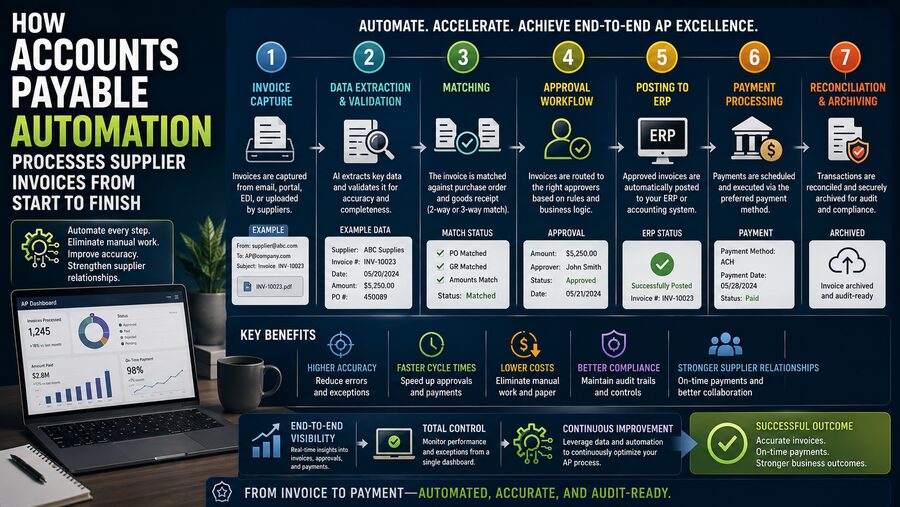
A modern AP automation system can capture incoming invoices, extract data, validate information, match invoices to purchase orders and receipts, route exceptions for approval, create accounting entries, schedule payments, and maintain a complete audit trail.
The overall process can be summarized as:
Invoice received 📥 ➡️ Data captured 🔍 ➡️ Information validated ✅ ➡️ Invoice matched 🔗 ➡️ Approval obtained 👤 ➡️ Accounting recorded 📊 ➡️ Payment issued 💳 ➡️ Invoice archived 🗂️
The result is a faster and more controlled way to manage supplier payments.
📄 What Is Accounts Payable?
Accounts Payable, or AP, represents money that a company owes to suppliers for goods or services already received.
Suppose a company buys office equipment worth $10,000 on 30-day payment terms.
The supplier sends an invoice.
Until that invoice is paid, the company records a liability:
Accounts Payable = $10,000
The AP team is responsible for making sure that:
- The invoice is legitimate
- The amount is correct
- The goods or services were actually received
- The correct manager approves the expense
- The accounting information is accurate
- The supplier is paid according to agreed terms
When hundreds or thousands of invoices arrive each month, this becomes a major operational process.
📥 Step 1: The Supplier Sends an Invoice
The AP process begins when a supplier submits an invoice.
Invoices may arrive through:
- Email attachments
- Supplier portals
- Electronic data interchange
- Structured electronic invoices
- Scanned paper documents
- Procurement platforms
In a manual process, an employee may need to monitor a shared AP inbox and download each document individually.
An automated platform can centralize these channels.
For example:
Supplier email ➡️ AP inbox ➡️ Automation platform
The system records when the invoice was received and creates a digital workflow.
This reduces the risk of invoices being lost in personal email accounts or forgotten on someone’s desk.
🔍 Step 2: Extracting Data From the Invoice
Once the invoice enters the system, the software needs to understand what it contains.
Typical invoice fields include:
- Supplier name
- Supplier ID
- Invoice number
- Invoice date
- Purchase order number
- Line-item descriptions
- Quantities
- Unit prices
- Tax
- Total amount
- Payment terms
- Bank or remittance details
Modern AP platforms may use OCR, document recognition, templates, machine learning, or structured invoice formats to extract this information.
For example, an invoice might state:
Supplier: ABC Industrial Supplies
Invoice: INV-78241
PO Number: PO-55109
Invoice Total: $18,450
Payment Terms: Net 30
The software converts those fields into structured data that can be sent to the accounting or ERP system.
🧠 Why Invoice Extraction Is More Difficult Than It Looks
Supplier invoices do not all follow the same design.
One supplier might put the invoice number in the upper-right corner.
Another may place it beneath the company logo.
Another may use a completely different format.
Line-item tables can also vary significantly.
Automation systems therefore need to identify the meaning of fields rather than relying only on their location.
The goal is to transform:
Human-readable document 📄
into:
Structured accounting data 💻
High-quality automation systems also assign confidence scores to extracted fields.
If the system is uncertain about a value, it can send that field to a human for review instead of silently making a questionable assumption.
✅ Step 3: Validating the Supplier
Before processing the invoice further, the system can verify that the supplier exists in the approved vendor master.
It may compare information such as:
- Supplier name
- Supplier account
- Tax identification
- Purchase-order ownership
- Payment details
If an invoice arrives from a supplier that does not exist in the system, it can be held for investigation.
This helps prevent incorrect or fraudulent invoices from being paid automatically.
🔢 Step 4: Detecting Duplicate Invoices
Duplicate invoices are a major accounts-payable risk.
A supplier may accidentally submit the same invoice twice.
An employee could also upload the same file more than once.
Without controls, the company might pay both copies.
Automation software can compare combinations such as:
Supplier + Invoice number + Amount + Date
If an identical or suspiciously similar invoice already exists, the system can flag it.
For example:
Invoice INV-78241 already processed ⚠️
Instead of creating another payable, the new submission is routed for review.
This simple control can prevent significant financial losses.
🔗 Step 5: Matching the Invoice to a Purchase Order
Many organizations use a purchase order, or PO, before buying goods or services.
A purchase order specifies what the company agreed to buy.
It may include:
- Supplier
- Items
- Quantities
- Prices
- Delivery location
- Terms
When the invoice arrives, AP automation can find the corresponding PO.
For example:
Invoice references PO-55109
The system retrieves PO-55109 from the procurement or ERP system and begins comparing the two documents.
📦 Step 6: Checking Whether the Goods Were Received
An invoice should not necessarily be paid simply because it matches a purchase order.
The company also wants confirmation that the goods or services were actually received.
A warehouse or receiving department may create a goods receipt when a shipment arrives.
The automation platform can compare three records:
Purchase Order 📋
Goods Receipt 📦
Supplier Invoice 📄
This is known as three-way matching.
🔎 How Three-Way Matching Works
Imagine the purchase order says:
100 units × $50 = $5,000
The receiving system confirms:
100 units received
The supplier invoice says:
100 units × $50 = $5,000
Everything matches.
The invoice can potentially proceed automatically.
Now imagine the supplier invoices:
110 units × $50 = $5,500
but only 100 were ordered and received.
The system detects the discrepancy and routes the invoice for investigation.
Three-way matching dramatically reduces the risk of paying for incorrect quantities or prices.
✌️ What Is Two-Way Matching?
Not every invoice requires a goods receipt.
For services, companies may use two-way matching:
Purchase Order ↔ Invoice
The system checks whether:
- Supplier matches
- Price matches
- Terms match
- Total falls within allowed tolerances
The exact matching method depends on company policy and purchase type.
📏 Tolerance Rules Prevent Unnecessary Manual Work
Small differences occur frequently.
Suppose a PO says:
$1,000
and the invoice says:
$1,003
The difference might be caused by rounding, freight, or another minor adjustment.
Instead of sending every tiny discrepancy to an employee, AP systems can use tolerance rules.
For example:
Difference below $10 or 1% ➡️ Accept automatically
Difference above tolerance ➡️ Route for review
This reduces manual workload while maintaining financial control.
🚨 Step 7: Managing Exceptions
Not every invoice will match perfectly.
Common exceptions include:
- Missing PO number
- Quantity mismatch
- Price mismatch
- Invalid supplier
- Duplicate invoice
- Missing receipt
- Incorrect tax
- Unexpected freight charges
Instead of leaving the AP team to chase problems manually, the system can route each exception to the appropriate person.
For example:
Price discrepancy ➡️ Buyer
Missing receipt ➡️ Warehouse manager
Unapproved service invoice ➡️ Department manager
This turns exception handling into a structured workflow.
👤 Step 8: Routing the Invoice for Approval
Invoices may require approval before payment.
The correct approver can depend on:
- Department
- Cost center
- Amount
- Supplier
- Expense category
- Project
- Location
For example:
Under $1,000 ➡️ Department supervisor
$1,000–$25,000 ➡️ Department manager
Above $25,000 ➡️ Director or finance executive
AP automation can apply these rules automatically.
The approver may receive a notification by email, mobile app, or internal workflow system.
Instead of searching for paper invoices, the approver sees the invoice and supporting documents digitally.
📱 Mobile and Remote Approvals
One advantage of automated workflows is that approvals do not need to happen inside the accounting department.
A manager traveling for work can receive a notification and approve an invoice from a phone or laptop.
This reduces delays caused by:
- Vacation
- Travel
- Remote work
- Paper circulation
The system can also send reminders when an invoice remains unapproved for too long.
📊 Step 9: Coding the Invoice to the General Ledger
Every invoice must be assigned to the correct accounting categories.
For example, an invoice might be coded to:
- Office supplies
- Marketing expense
- Equipment
- Inventory
- Repairs
- Utilities
It may also require:
- Cost center
- Department
- Project
- Legal entity
- Tax code
Automation software can populate these fields from purchase-order information or historical patterns.
For example, invoices from a particular utility supplier may usually post to:
Utilities Expense ➡️ Building 04 ➡️ Facilities Department
The system can suggest or automatically apply the coding based on established rules.
🧾 Step 10: Creating the Accounting Entry
After validation and approval, the invoice is ready to be posted.
A basic accounting entry might be:
Debit: Expense or Asset
Credit: Accounts Payable
For example:
Office Equipment      $10,000
    Accounts Payable            $10,000
This records both:
- The cost or asset acquired
- The obligation to pay the supplier
The AP automation platform may send this information directly to an ERP such as a financial management system.
💳 Step 11: Scheduling the Payment
Once the invoice is approved and posted, the company decides when to pay it.
Payment timing depends on supplier terms.
Common terms include:
- Due on receipt
- Net 15
- Net 30
- Net 60
Suppose an invoice dated August 1 has Net 30 terms.
The payment may be due around August 31.
Automation software can calculate this due date and include the invoice in the appropriate payment run.
💰 Capturing Early-Payment Discounts
Some suppliers offer discounts for early payment.
A common example is:
2/10, Net 30
This means:
Pay within 10 days ➡️ Receive 2% discount
Otherwise, the full amount is due within 30 days.
For a $100,000 invoice:
2% discount = $2,000 savings
AP automation helps companies identify these opportunities before the discount window closes.
🏦 Step 12: Creating the Payment
Payments can be made through methods such as:
- Bank transfer
- ACH
- Wire transfer
- Check
- Virtual card
- Other electronic payment networks
The system groups approved invoices into a payment batch.
For example:
Supplier A: $18,450
Supplier B: $7,200
Supplier C: $32,900
Depending on internal controls, the payment batch may require additional treasury or finance approval.
🔐 Segregation of Duties
Good accounts-payable controls prevent one person from controlling every stage.
For example:
Employee A creates supplier
Employee B approves invoice
Employee C releases payment
This principle is called segregation of duties.
AP automation can enforce these role restrictions electronically.
Someone who can modify supplier bank information may not be permitted to authorize payment to that supplier.
This reduces fraud risk.
🚨 Detecting Suspicious Changes
Supplier-payment fraud often involves attempts to change bank account details.
An automation platform may flag unusual situations such as:
- Bank account recently changed
- Supplier asks for urgent payment
- First invoice from a new supplier
- Invoice amount far above historical norms
- Multiple suppliers sharing the same bank account
These controls do not eliminate fraud, but they can identify transactions requiring additional review.
📨 Step 13: Sending Remittance Information
After payment is issued, the supplier needs to know which invoices were paid.
The company can send a remittance advice containing:
- Payment amount
- Payment date
- Invoice numbers
- Deductions
- Reference numbers
This helps the supplier apply the payment correctly to its accounts receivable records.
Automation can generate and send these messages automatically.
🔄 Step 14: Reconciling Payment Status
After the bank processes the payment, the AP system can update the invoice status.
For example:
Approved ➡️ Scheduled ➡️ Payment submitted ➡️ Paid
Bank information may also be imported for reconciliation.
This verifies that the payment recorded in the accounting system corresponds to the actual bank transaction.
🗂️ Step 15: Archiving the Invoice and Audit Trail
The process does not end when the invoice is paid.
Businesses often need to retain:
- Original invoice
- Purchase order
- Goods receipt
- Approval history
- Accounting coding
- Payment details
- Notes about exceptions
An AP automation system stores these records electronically.
Instead of searching through filing cabinets, auditors can retrieve the complete transaction history from the system.
🔍 Why the Audit Trail Matters
Imagine an auditor asks:
“Why did the company pay Supplier XYZ $47,800 six months ago?”
An automated system can show:
Invoice received ➡️ PO matched ➡️ Goods received ➡️ Manager approved ➡️ Finance posted ➡️ Payment released
Each step may include:
- User
- Timestamp
- Action
- Supporting document
This creates clear accountability.
🤖 Where AI Can Help AP Automation
AI and machine learning can enhance accounts-payable processes by helping with:
- Invoice field extraction
- GL-code suggestions
- Duplicate detection
- Anomaly detection
- Supplier matching
- Exception classification
For example, if hundreds of invoices from the same supplier are historically coded to one expense account, the system may recommend that code automatically.
Human review is still important for uncertain or unusual transactions.
📊 AP Dashboards and Analytics
Automation also makes accounts-payable activity easier to analyze.
A finance team may track:
- Number of invoices processed
- Average processing time
- Invoices awaiting approval
- Duplicate invoices prevented
- Discounts captured
- Exception rates
- Upcoming cash requirements
Management can quickly see bottlenecks.
If one department consistently takes ten days to approve invoices while others take two, the workflow can be investigated.
⏱️ Straight-Through Processing
The ideal automated invoice may require almost no manual intervention.
Suppose:
- Supplier is approved
- PO exists
- Goods receipt matches
- Price matches
- Amount is within policy
- No duplicate exists
The invoice can move automatically from receipt to posting.
This is known as straight-through processing or touchless processing.
Human employees then focus on exceptions rather than repetitive data entry.
📉 Why Automation Reduces Processing Costs
Manual AP requires labor for:
- Data entry
- Document filing
- Approval chasing
- Error correction
- Duplicate investigation
Automation reduces these repetitive tasks.
The more invoices an organization processes, the greater the potential savings.
Instead of adding AP staff every time transaction volume increases, companies can often process more invoices using the same team.
🤝 Better Supplier Relationships
Late or incorrect payments can damage supplier relationships.
Suppliers may repeatedly contact AP asking:
“Where is our invoice?”
“Has it been approved?”
“When will we be paid?”
Automated systems provide clearer invoice status and more predictable payment timing.
Some platforms include supplier portals where vendors can check status themselves.
This reduces both AP workload and supplier frustration.
⚠️ Automation Still Needs Good Master Data
AP automation depends heavily on accurate underlying information.
Poor supplier-master data can cause problems such as:
- Incorrect payment details
- Duplicate supplier records
- Wrong payment terms
- Missing tax information
Automation can accelerate a good process, but it can also accelerate errors if business rules and master data are poorly designed.
Organizations therefore need strong data governance.
🔗 Integration With ERP and Procurement Systems
An AP platform rarely operates in isolation.
It commonly integrates with:
- ERP systems
- Procurement platforms
- Banking systems
- Expense-management systems
- Tax systems
- Supplier portals
The goal is to avoid repeatedly entering the same information.
For example:
Purchase order created in procurement system ➡️ Automatically available to AP matching engine
This integration creates a continuous procure-to-pay workflow.
🔄 AP Automation Within Procure-to-Pay
Accounts payable is one part of a larger process known as procure-to-pay, or P2P.
The full cycle can look like:
Purchase request 🛒 ➡️ Approval ✅ ➡️ Purchase order 📋 ➡️ Goods received 📦 ➡️ Supplier invoice 📄 ➡️ AP processing 💼 ➡️ Payment 💳
Connecting these steps provides stronger controls and better visibility.
The system knows not only that an invoice exists, but also why the purchase was made and whether the company actually received what it ordered.
🧠 A Complete Example
Imagine a manufacturer orders 500 components from a supplier.
The process might work like this:
- 📋 Procurement creates PO-90025 for 500 components at $20 each.
- 📦 The warehouse records that all 500 units arrived.
- 📄 The supplier emails an invoice for $10,000.
- 🔍 AP automation extracts the supplier, invoice number, PO, and amount.
- ✅ The vendor record is validated.
- ♻️ Duplicate checking confirms the invoice has not been processed previously.
- 🔗 The invoice matches the PO.
- 📦 The quantity matches the goods receipt.
- 🎯 The price falls within tolerance.
- 📊 Accounting coding is inherited from the PO.
- ✅ The invoice is automatically approved under company policy.
- 💼 The ERP records the $10,000 payable.
- 📅 The system schedules payment according to Net 30 terms.
- 💳 Treasury releases the payment.
- 📨 The supplier receives remittance advice.
- 🗂️ The invoice, PO, receipt, approvals, and payment details remain stored for audit.
If everything matches, the AP team may never need to manually type information from the invoice.
🌟 The Bigger Picture
Accounts Payable automation transforms supplier invoice processing from a chain of manual administrative tasks into a controlled digital workflow.
The complete lifecycle typically follows:
Invoice received 📥 ➡️ Data extracted 🔍 ➡️ Supplier validated ✅ ➡️ Duplicate checked ♻️ ➡️ PO and receipt matched 🔗 ➡️ Exceptions resolved 🚨 ➡️ Approval obtained 👤 ➡️ Accounting posted 📊 ➡️ Payment scheduled 📅 ➡️ Supplier paid 💳 ➡️ Records archived 🗂️
The greatest benefit is not simply faster invoice entry.
Automation strengthens the entire financial control process.
It can reduce duplicate payments, prevent unauthorized transactions, accelerate approvals, capture early-payment discounts, improve cash-flow visibility, create audit trails, and give suppliers more predictable payment experiences.
At the same time, automation does not eliminate the need for human judgment.
Finance employees remain important for investigating exceptions, resolving supplier disputes, reviewing unusual transactions, maintaining controls, and managing relationships.
The role of AP therefore changes from manually processing every invoice to supervising an automated system and focusing on the transactions that actually require attention. 🤖💼
For organizations processing thousands or millions of supplier invoices, that shift can transform Accounts Payable from a paperwork-heavy back-office function into a faster, more accurate, and more strategically useful part of financial operations. 📊⚙️💳