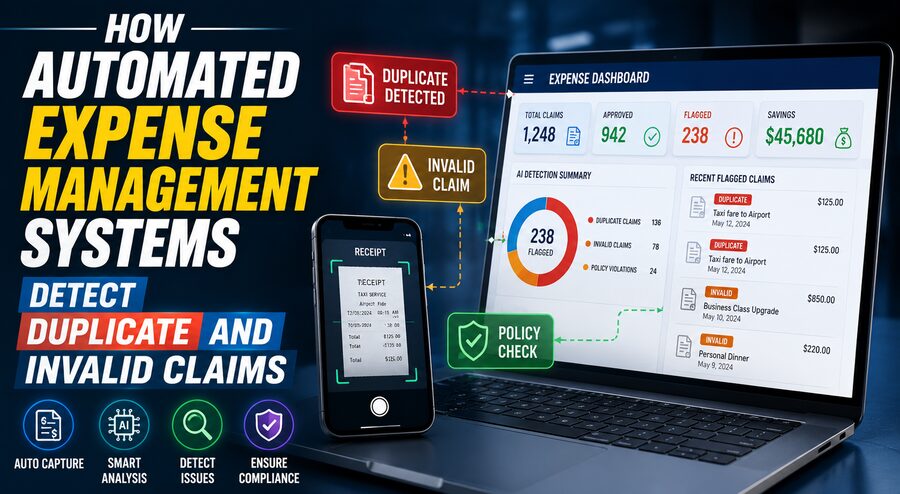

Employee expense claims are a normal part of business operations. Workers may submit receipts for flights, hotels, meals, taxis, office supplies, client meetings, or other work-related purchases. For companies with hundreds or thousands of employees, reviewing every expense manually can become a major administrative burden. 🧾🏢
The challenge is not just processing claims quickly. Finance teams must also detect problems such as:
- Duplicate receipts
- Claims submitted twice
- Expenses outside company policy
- Incorrect amounts
- Personal purchases
- Missing documentation
- Suspicious merchants
- Altered receipts
- Expenses submitted by the wrong employee
- Claims that exceed allowed limits
Modern automated expense management systems address these problems by combining rules, document recognition, data matching, statistical analysis, and increasingly artificial intelligence. 🤖📊
Rather than relying on a human reviewer to inspect every receipt line by line, the software automatically checks each claim against historical expenses, company policies, transaction records, and other available information.
The result is faster reimbursement for legitimate expenses while suspicious claims are routed to finance teams for closer review.
🧾 What Is an Automated Expense Management System?
An automated expense management system is software that handles some or all of the expense-reporting workflow.
A typical process may look like this:
Employee makes purchase
⬇️
Receipt is photographed or uploaded
⬇️
Software extracts receipt details
⬇️
Claim is compared with company policy
⬇️
Duplicate and fraud checks are performed
⬇️
Valid claim is automatically approved or forwarded
⬇️
Suspicious claim is flagged for review
Modern systems may integrate with:
- Corporate credit cards 💳
- Accounting software
- Payroll systems
- Travel-booking platforms ✈️
- ERP systems
- Banking feeds
- HR databases
- Mobile applications 📱
This integration gives the software much more information than a standalone receipt image.
📷 Step 1: Extracting Information From Receipts
One of the first tasks is turning a receipt into structured data.
A receipt might contain:
- Merchant name
- Date
- Time
- Total amount
- Currency
- Tax
- Individual line items
- Payment method
- Receipt number
Historically, employees had to type these details manually.
Modern systems can use optical character recognition and document-understanding models to extract them automatically. 🔍
For example, a restaurant receipt might be converted into:
Merchant: Riverside Bistro
Date: August 17
Total: $86.40
Tax: $6.40
Currency: USD
Once these details are structured, the expense can be compared against other records.
🔁 How Duplicate Expense Detection Works
Duplicate detection is one of the most valuable automated checks.
Suppose an employee accidentally uploads the same $86.40 restaurant receipt twice.
The system can compare the new claim with previously submitted expenses.
It may examine fields such as:
- Employee ID
- Merchant
- Transaction date
- Amount
- Currency
- Receipt number
If all or most of those fields match, the system assigns a high probability that the expense is a duplicate.
Conceptually:
Same employee + same merchant + same date + same amount = possible duplicate
The software can then block the claim or ask for confirmation.
🧠 Detecting Near-Duplicates
Not every duplicate is an exact copy.
An employee might submit:
Claim 1: $147.82 at Grand Hotel on May 4
and later:
Claim 2: $147.82 at GRAND HTL on May 4
The merchant names differ slightly, but the transactions may still be identical.
Automated systems can use fuzzy matching to identify these near-duplicates.
Instead of requiring perfect text equality, the software estimates how similar two records are.
It may normalize:
- Uppercase and lowercase
- Abbreviations
- Punctuation
- Merchant aliases
- Date formats
For example:
“McDonald’s #1042”
and
“MCDONALDS 1042”
can be recognized as probably referring to the same merchant. 🔎
🖼️ Comparing Receipt Images
Some systems can also compare the receipts themselves.
Imagine the same photograph is uploaded twice but the employee changes the manually entered description.
Text-only comparison could miss the duplicate.
Image analysis can detect that the underlying receipt appears identical.
Systems may compare:
- Image fingerprints
- Receipt layout
- Extracted text
- Transaction identifiers
This adds another layer of protection against duplicate reimbursement.
💳 Matching Claims With Corporate Card Transactions
If the company issues corporate cards, the expense system can automatically match each receipt to the corresponding card transaction.
Suppose the banking feed shows:
Hotel Central — $328.90 — August 12
and the employee submits:
Hotel Central — $328.90 — August 12
The system can pair them.
Now imagine the employee submits the same receipt a second time.
There is still only one matching corporate-card transaction.
That mismatch is a strong duplicate indicator. 🚨
Card reconciliation can therefore make duplicate detection considerably more reliable.
⚠️ What Makes an Expense “Invalid”?
An invalid claim is not necessarily fraudulent.
It may simply violate company policy or contain incorrect information.
Common examples include:
- Meal exceeds permitted amount
- Alcohol is not reimbursable
- Expense was submitted too late
- Required receipt is missing
- Business purpose is not provided
- Personal travel was included
- Hotel rate exceeds policy
- Employee used an unapproved travel class
Automated systems evaluate these conditions using configurable business rules.
📜 Policy Rules Can Be Checked Instantly
Suppose a company allows:
Maximum dinner expense: $75 per person
An employee submits:
Dinner: $118
The system does not need a finance analyst to discover the problem.
It compares the amount with the policy and flags it automatically.
The message might say:
⚠️ Expense exceeds the $75 meal limit.
The employee may then need to explain the exception or reduce the reimbursable amount.
This eliminates many routine checks from the finance team’s workload.
🌍 Location-Based Validation
Location information can also help validate claims.
Suppose an employee reports:
Taxi expense in London
but their approved travel itinerary shows they were in Singapore that day.
The inconsistency may trigger a review.
Systems can compare:
- Expense location
- Employee travel bookings
- Office location
- Corporate-card location
- Mobile app metadata
Location mismatches do not automatically prove fraud, but they can identify claims that deserve closer inspection. 🌍🔍
📅 Date Validation
Expense dates can be checked against other business records.
For example, a claim may be suspicious if:
- It occurred before employment began
- It occurred after employment ended
- It is outside the approved trip dates
- It falls on a personal leave period
- It is submitted many months late
Date checks are simple but powerful because invalid claims frequently contain inconsistent timing.
👥 Headcount and Meal Validation
Meal expenses often depend on the number of attendees.
Suppose an employee submits:
Business dinner: $600
and indicates:
2 attendees
If policy allows $100 per person, the permitted amount would be:
2 × $100 = $200
The claim is significantly over the policy threshold.
The system can automatically calculate this and request justification.
Some platforms may also compare attendee names with employee records or CRM contacts.
🧾 Detecting Missing or Weak Documentation
Company policy may require receipts above a certain amount.
For example:
Receipt required for expenses over $25
If an employee submits a $140 expense with no receipt, the software can immediately flag it.
Document analysis may also identify low-quality uploads such as:
- Blank images
- Screenshots without transaction details
- Cropped receipts
- Unreadable photographs
The employee can be asked to provide better documentation before the report moves forward. 📷
🕵️ Identifying Suspicious Merchant Categories
Corporate card transactions usually contain merchant-category information.
This can help systems detect purchases from categories that may be inappropriate for business reimbursement.
Examples might include:
- Personal entertainment
- Gambling
- Certain retail purchases
- Cash-equivalent transactions
Company policy determines which categories are prohibited or require additional approval.
A transaction occurring at an unusual merchant can therefore be automatically escalated.
📊 Statistical Anomaly Detection
Rules are excellent for known violations.
Artificial intelligence and statistical analysis can help identify unusual behavior that does not match a predefined rule.
Suppose an employee normally submits:
$300–$500 per month in travel expenses
but suddenly submits:
$6,800 in one month
That does not necessarily mean the claims are invalid.
Perhaps the employee attended an expensive international conference.
But the behavior is unusual enough to justify review.
This is called anomaly detection. 📈
🤖 Machine Learning Can Learn Normal Spending Patterns
Machine-learning models can analyze historical expense data to understand patterns such as:
- Typical spending by employee
- Normal merchant types
- Average meal costs
- Common travel routes
- Typical submission timing
- Frequency of expenses
A new claim can then receive a risk score.
For example:
Low risk ✅
Routine merchant, normal amount, matching card transaction.
Medium risk ⚠️
Unusually high amount but valid documentation.
High risk 🚨
Duplicate-like receipt, unusual merchant, altered amount, and inconsistent travel date.
Finance teams can prioritize high-risk claims instead of reviewing every expense equally.
🧮 Risk Scoring
Automated systems often combine several signals into one score.
A simplified scoring model might consider:
Duplicate similarity + policy violations + merchant risk + unusual amount + documentation quality
The result could be:
Risk score: 92/100
A high score does not necessarily mean fraud has occurred.
It means the claim deserves manual investigation.
This approach helps organizations focus human attention where it is most valuable.
🔍 Detecting Altered Receipts
Receipt manipulation is more difficult to detect than simple duplicates.
An employee might modify:
- Total amount
- Date
- Merchant name
- Tip
- Line item
Advanced document-analysis systems may look for inconsistencies such as:
- Different fonts
- Misaligned text
- Unusual spacing
- Image editing artifacts
- Arithmetic inconsistencies
- Mismatch with corporate-card data
For example, if a receipt image says:
Total: $174.00
but the corporate-card record shows:
$74.00
the discrepancy can be automatically flagged.
➕ Checking Receipt Arithmetic
Automated systems can also verify that receipt totals make mathematical sense.
Suppose the receipt contains:
Subtotal: $85
Tax: $7
Total: $105
But:
85 + 7 = 92
The amounts do not reconcile.
The software can flag the receipt for review.
Similarly, a system can compare:
Subtotal + tax + tip = final total
This is a straightforward way to detect data-entry errors or potentially altered documentation. 🧮
🔄 Cross-Employee Duplicate Detection
Duplicates are not always submitted by the same employee.
Suppose two employees attend the same business dinner.
Employee A pays the entire bill.
But both employees later upload a copy of the same receipt.
If the system checks only within one employee’s history, it could miss the duplicate.
A stronger platform can search across the entire organization.
It may detect:
Same merchant + same date + same amount + similar receipt image + different employees
and flag the claims as possible shared duplicates.
✈️ Travel Booking Reconciliation
Expense platforms can integrate with travel-booking systems.
If a company already paid for an airline ticket centrally, an employee should not submit the same airfare for reimbursement.
The system may compare expense claims against:
- Flight bookings
- Hotel reservations
- Rental-car bookings
- Company-paid travel
A duplicated travel charge can then be caught automatically.
💱 Currency Validation
International travel introduces additional complexity.
An employee may spend:
€120
but submit reimbursement in dollars.
The system can validate:
- Original currency
- Exchange rate
- Conversion date
- Reimbursed amount
If the employee claims an unrealistic exchange rate, the software can calculate the proper conversion or flag the discrepancy. 💱
🏢 Matching Claims With Employee Roles
Expense policies can differ between employees.
For example:
- Sales employees may have customer entertainment allowances.
- Executives may have different travel policies.
- Field engineers may be allowed specific equipment purchases.
The system can use HR information to determine which policy applies.
This prevents a single rigid policy from incorrectly flagging legitimate expenses.
🧠 Context Matters
Automation should not assume every policy exception is invalid.
Suppose a hotel policy allows:
$250 per night
but an employee pays:
$340
If a major conference caused all local hotels to become expensive, the claim could be reasonable.
A good expense system routes the case for explanation rather than automatically accusing the employee of wrongdoing.
Automation works best when it distinguishes:
Policy exception ⚠️
from
Proven fraud 🚫
The two are not the same.
🛡️ Human-in-the-Loop Review
For ambiguous claims, human review remains essential.
The system may automatically approve low-risk expenses and escalate only suspicious ones.
A finance reviewer might see:
Reason for flag:
- Possible duplicate
- Amount differs from card feed
- Submitted 74 days late
The reviewer can then examine the evidence and decide whether to:
- Approve
- Reject
- Request information
- Escalate
This human-in-the-loop model combines automation efficiency with human judgment.
⚡ Real-Time Policy Warnings
Modern expense tools can identify problems before the employee even submits the report.
Suppose an employee photographs a receipt for:
$145 dinner
while company policy permits:
$80
The mobile app can immediately display:
⚠️ This expense exceeds your meal allowance by $65.
The employee can add a justification while the event is still fresh.
This is more efficient than discovering the problem weeks later during finance review.
📱 Mobile Receipt Capture
Mobile apps have transformed expense reporting.
Employees can photograph receipts immediately after making a purchase.
The system can automatically extract:
- Date
- Merchant
- Amount
- Tax
Immediate capture reduces the risk that receipts are lost.
It also enables real-time duplicate and policy checks instead of waiting for a monthly expense report.
🔐 Preventing Reimbursement of Corporate-Card Expenses
A frequent accounting problem occurs when an employee pays with a company card but mistakenly submits the purchase as a personally paid expense.
If reimbursed, the company effectively pays twice:
Once to the card provider
and
Once to the employee
Integrated expense systems can identify that the transaction came from a corporate card and mark it as:
Company paid — not reimbursable
This simple validation can prevent significant leakage. 💳
🧾 Detecting Split Transactions
Sometimes a single expense is divided into several smaller claims.
For example, if policy requires extra approval for purchases over:
$500
someone might submit:
$290
and:
$280
for purchases from the same merchant on the same day.
The individual amounts appear acceptable, but together they exceed the threshold.
Automated systems can detect clusters of related expenses and flag possible transaction splitting.
⏱️ Submission-Timing Patterns
The timing of expense submissions can also provide clues.
For example, a system may flag patterns such as:
- Many claims submitted immediately before a reporting deadline
- Repeated claims submitted months after transactions
- Multiple historical receipts suddenly uploaded together
Again, these patterns are not proof of misconduct.
They simply provide additional risk signals.
📈 Learning From Reviewer Decisions
When finance teams approve or reject flagged claims, those decisions can improve future automation.
Suppose the system repeatedly flags a particular airport transportation company as unusual.
Reviewers consistently approve it.
The software may learn that this merchant is normal for traveling employees.
Similarly, confirmed invalid claims can become examples that help improve detection models.
This creates a feedback loop:
More reviewed claims → better patterns → more accurate detection → fewer unnecessary reviews 🔄🤖
🧑⚖️ Audit Trails
Expense systems need strong audit trails.
For every claim, the platform may record:
- Who submitted it
- When it was submitted
- Which receipt was attached
- Which automated checks ran
- Which rules were violated
- Who approved it
- Who changed it
- When reimbursement occurred
This creates an evidence trail useful for:
- Internal audits
- External audits
- Compliance reviews
- Fraud investigations
Automation therefore improves not only speed but also traceability. 📋
📊 Dashboards Reveal Organization-Wide Patterns
Finance teams can use dashboards to see broader spending behavior.
They may track:
- Most common policy violations
- Highest-spending departments
- Duplicate claims prevented
- Frequent exception categories
- Average approval time
- Suspicious merchant activity
This allows management to improve expense policies and employee training.
For example, if hundreds of employees repeatedly violate the same rule, the problem may be unclear policy rather than employee behavior.
🛡️ Why False Positives Matter
An overly aggressive detection system can create frustration.
Imagine legitimate employees constantly receiving warnings for ordinary expenses.
Finance teams then spend enormous amounts of time clearing false alarms.
Therefore, the goal is not:
Flag as many claims as possible
but rather:
Identify the most meaningful risks with high precision.
Good systems balance fraud detection with employee convenience.
⚠️ Automated Detection Is Not Perfect
Expense-management systems can still make mistakes.
Potential limitations include:
- Poor receipt image quality
- Unusual merchant names
- Incorrect card data
- Complex shared expenses
- Currency conversion issues
- Genuine policy exceptions
- Limited historical information
Human oversight remains important for unusual or high-value cases.
Automation should support financial controls, not create the illusion that every flagged claim is fraudulent.
💰 Why Duplicate Detection Matters Financially
A duplicate claim of $30 may seem insignificant.
But across a large organization with:
20,000 employees
even a small percentage of duplicate or invalid reimbursements can accumulate into substantial annual losses.
Automated controls operate consistently across every claim.
Unlike humans, software does not become tired after reviewing hundreds of receipts.
This makes automation particularly valuable at scale.
🚀 The Future of Automated Expense Auditing
Expense systems are becoming increasingly intelligent.
Future platforms may combine:
- AI document understanding 🤖
- Corporate-card feeds 💳
- Travel data ✈️
- HR systems 👥
- Merchant databases
- Behavioral analytics
- Real-time policy engines
- Automated accounting
Instead of merely processing expenses after they occur, systems may increasingly prevent problematic spending before reimbursement is ever requested.
For example, a corporate card could warn an employee at the point of purchase that the transaction is outside policy.
This shifts expense management from:
Detect after submission
toward:
Prevent before payment
🏁 Final Thoughts
Automated expense management systems detect duplicate and invalid claims by converting receipts into structured data and comparing each expense against multiple sources of evidence.
A typical system may check:
Merchant + date + amount + employee + receipt image + corporate-card transaction + travel record + company policy
to determine whether the claim appears valid. 🔍
Exact matches can reveal straightforward duplicates.
Fuzzy matching can uncover claims where merchant names or formatting differ.
Corporate-card reconciliation helps prove whether a real transaction occurred.
Policy engines detect expenses that exceed limits or lack required documentation.
Machine-learning systems can identify unusual spending patterns that fixed rules might miss.
When several warning signals appear together, the expense receives a higher risk score and is routed for human review. 🚨
The purpose is not simply to catch dishonest employees.
Automation also catches ordinary mistakes such as accidentally uploading the same receipt twice, using the wrong reimbursement category, forgetting required documentation, or claiming a company-paid purchase as personal spending.
The most effective systems therefore combine:
Automation for routine checks + AI for pattern detection + humans for judgment.
That combination allows legitimate expenses to move through the process quickly while suspicious claims receive the attention they deserve.
For large organizations processing thousands or millions of transactions, this can reduce financial leakage, accelerate reimbursement, improve compliance, and give finance teams a much clearer view of how company money is being spent. 💳🧾🤖✨